Hash Indexes
Learn how hash indexes work in databases by combining in-memory hash maps with append-only logs. Discover the Bitcask storage engine, compaction, and when hash indexes are the perfect choice.
Starting with What You Already Know
If you've written code in Python, JavaScript, Java, or almost any modern programming language, you've used a hash map (also called a dictionary or hash table). It's that data structure where you store key-value pairs and can look up any value by its key in constant time, O(1). You say "give me the value for key X" and boom, you have it instantly.
Here's the insight that makes hash indexes work: why not use the same idea to index data on disk?
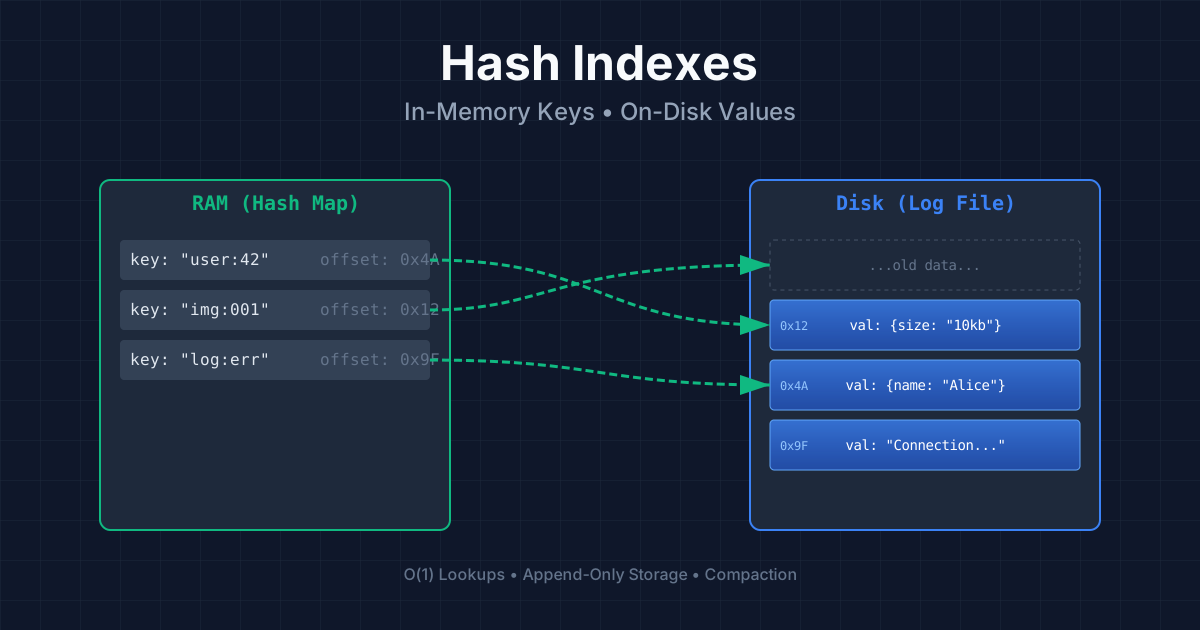
We already have our append-only log file from the previous section. Every time we write a key-value pair, we append it to the file. The problem was that reading required scanning the entire file. But what if we kept a hash map in memory that tells us exactly where each key's value lives in the file?
How It Works
The concept is beautifully simple. Your hash map doesn't store the actual values, that would defeat the purpose since values can be huge. Instead, it stores the byte offset in the file where each key's value begins. When you need to read a value:
- Look up the key in the hash map → get the byte offset
- Seek to that position in the file
- Read the value
One disk seek, and you have your data. If the file is already in the operating system's cache, you might not even need disk I/O at all.
class HashIndexedDatabase:
    def __init__(self, filename):
        self.filename = filename
        self.index = {}  # key -> byte offset
        self._rebuild_index()

    def _rebuild_index(self):
        """Scan file once at startup to build the index."""
        try:
            with open(self.filename, 'rb') as f:
                while True:
                    offset = f.tell()
                    # Read key length (4 bytes), then key, then value length, then value
                    key_len_bytes = f.read(4)
                    if not key_len_bytes:
                        break
                    key_len = int.from_bytes(key_len_bytes, 'big')
                    key = f.read(key_len).decode('utf-8')
                    val_len = int.from_bytes(f.read(4), 'big')
                    f.read(val_len)  # Skip the value, we just need the offset
                    self.index[key] = offset
        except FileNotFoundError:
            pass

    def set(self, key, value):
        """Append to file and update hash index."""
        with open(self.filename, 'ab') as f:
            offset = f.tell()
            key_bytes = key.encode('utf-8')
            val_bytes = value.encode('utf-8')
            # Write: key_length + key + value_length + value
            f.write(len(key_bytes).to_bytes(4, 'big'))
            f.write(key_bytes)
            f.write(len(val_bytes).to_bytes(4, 'big'))
            f.write(val_bytes)
            self.index[key] = offset

    def get(self, key):
        """O(1) lookup using hash index!"""
        if key not in self.index:
            return None

        with open(self.filename, 'rb') as f:
            f.seek(self.index[key])
            key_len = int.from_bytes(f.read(4), 'big')
            f.read(key_len)  # Skip the key
            val_len = int.from_bytes(f.read(4), 'big')
            return f.read(val_len).decode('utf-8')


# Usage
db = HashIndexedDatabase("videos.db")
db.set("cat_video_1", '{"views": 1000000, "likes": 50000}')
db.set("cat_video_2", '{"views": 500000, "likes": 25000}')

print(db.get("cat_video_1"))  # Instant lookup!
This Is a Real Production System
This might sound too simple to be real, but it's exactly how Bitcask works, the default storage engine for Riak, a distributed database. Bitcask offers incredibly high performance for both reads and writes, with one important constraint: all your keys must fit in RAM.
Think about that trade-off. The keys live in memory, but the values live on disk. If you have a million keys of 100 bytes each, that's only 100 MB of RAM for the index. But your values could be gigabytes, they're on disk, loaded only when needed.
The Perfect Use Case: Frequent Updates to Existing Keys
Hash indexes shine when you have lots of writes, but not too many distinct keys. The classic example is tracking video view counts:
- Key: Video URL (there are millions, but they fit in RAM)
- Value: Play count and statistics
- Pattern: Every time someone watches, increment the counter
You're constantly updating values, but the set of keys grows slowly. This is perfect for a hash-indexed append-only log.
# Simulating the video view count use case

class VideoTracker:
    def __init__(self):
        self.db = HashIndexedDatabase("video_stats.db")

    def record_view(self, video_url):
        """Called every time someone watches a video."""
        # Get current stats (or default)
        import json
        stats_json = self.db.get(video_url)
        if stats_json:
            stats = json.loads(stats_json)
            stats['views'] += 1
        else:
            stats = {'views': 1, 'first_viewed': '2024-01-15'}

        # Write updated stats (appends to log, updates index)
        self.db.set(video_url, json.dumps(stats))

    def get_views(self, video_url):
        import json
        stats_json = self.db.get(video_url)
        return json.loads(stats_json)['views'] if stats_json else 0


tracker = VideoTracker()

# Millions of view events per day
tracker.record_view("youtube.com/watch?v=cat123")
tracker.record_view("youtube.com/watch?v=cat123")
tracker.record_view("youtube.com/watch?v=dog456")
tracker.record_view("youtube.com/watch?v=cat123")

print(tracker.get_views("youtube.com/watch?v=cat123"))  # 3
The Disk Space Problem: Compaction
Wait, if we only append and never overwrite, won't we run out of disk space? Every update creates a new entry, and the old ones just sit there taking up space.
The solution is compaction. Here's how it works:
- Break the log into segments (files of a fixed maximum size)
- When a segment is full, close it and start a new one
- In the background, compact old segments by throwing away outdated entries
- Keep only the most recent value for each key
Let's trace through a concrete example with video play counts:
Merging Segments
Compaction typically shrinks segments significantly (because keys are overwritten many times). So we can go further and merge multiple compacted segments into one:
The beautiful thing is that merging happens in a background thread. While the merge is running, the database keeps serving reads and writes using the old segments. Only when the merge is complete do we atomically switch to the new merged segment and delete the old ones.
class SegmentedHashDatabase:
    """Simplified demonstration of segmented storage with compaction."""

    def __init__(self, base_path, max_segment_size=1024):
        self.base_path = base_path
        self.max_segment_size = max_segment_size
        self.segments = []  # List of (filename, hash_index) tuples
        self.current_segment = None
        self.current_index = {}
        self._init_new_segment()

    def _init_new_segment(self):
        """Start a new segment file."""
        import os
        segment_id = len(self.segments)
        filename = f"{self.base_path}/segment_{segment_id}.db"
        os.makedirs(self.base_path, exist_ok=True)

        if self.current_segment:
            # Save old segment
            self.segments.append((self.current_segment, self.current_index))

        self.current_segment = filename
        self.current_index = {}
        open(filename, 'wb').close()  # Create empty file

    def set(self, key, value):
        """Write to current segment, roll over if too large."""
        import os

        # Check if we need a new segment
        if os.path.exists(self.current_segment):
            if os.path.getsize(self.current_segment) > self.max_segment_size:
                self._init_new_segment()

        # Append to current segment
        with open(self.current_segment, 'ab') as f:
            offset = f.tell()
            data = f"{key}:{value}\n".encode()
            f.write(data)
            self.current_index[key] = offset

    def get(self, key):
        """Check current segment first, then older segments."""
        # Check current segment
        if key in self.current_index:
            return self._read_from_segment(self.current_segment, self.current_index[key])

        # Check older segments (newest first)
        for filename, index in reversed(self.segments):
            if key in index:
                return self._read_from_segment(filename, index[key])

        return None

    def _read_from_segment(self, filename, offset):
        with open(filename, 'rb') as f:
            f.seek(offset)
            line = f.readline().decode().strip()
            return line.split(':', 1)[1]

    def compact_and_merge(self):
        """Merge all frozen segments into one compacted segment."""
        if not self.segments:
            return

        # Collect all key-value pairs, keeping only the latest
        merged = {}
        for filename, index in self.segments:
            for key in index:
                merged[key] = self._read_from_segment(filename, index[key])

        # Write to new merged segment
        new_filename = f"{self.base_path}/merged_{len(self.segments)}.db"
        new_index = {}
        with open(new_filename, 'wb') as f:
            for key, value in merged.items():
                offset = f.tell()
                f.write(f"{key}:{value}\n".encode())
                new_index[key] = offset

        # Atomic switch (in real implementation, this needs careful handling)
        old_files = [f for f, _ in self.segments]
        self.segments = [(new_filename, new_index)]

        # Delete old segment files
        import os
        for old_file in old_files:
            os.remove(old_file)

        print(f"Merged {len(old_files)} segments into 1")
Real-World Implementation Details
Making this simple idea work in production requires handling several tricky details:
Binary Format, Not CSV
CSV is human-readable but slow to parse and wastes space. Real implementations use binary formats: store the length of each string first, then the raw bytes.
Deleting Records: Tombstones
How do you delete a key from an append-only log? You can't erase it. Instead, you append a special marker called a tombstone. When compaction runs, it sees the tombstone and knows to discard all previous values for that key.
Crash Recovery
When the database restarts, those in-memory hash maps are gone. You could rebuild them by scanning all segment files, but that's slow for large files. Bitcask solves this by periodically saving snapshots of each segment's hash map to disk. On startup, load the snapshots instead of scanning.
import pickle

def save_index_snapshot(index, snapshot_path):
    """Save hash index to disk for fast recovery."""
    with open(snapshot_path, 'wb') as f:
        pickle.dump(index, f)

def load_index_snapshot(snapshot_path):
    """Load hash index from disk snapshot."""
    try:
        with open(snapshot_path, 'rb') as f:
            return pickle.load(f)
    except FileNotFoundError:
        return None

# Usage
index = {'key1': 0, 'key2': 100, 'key3': 200}
save_index_snapshot(index, 'segment_1.snapshot')

# After crash, recover quickly
recovered_index = load_index_snapshot('segment_1.snapshot')
Handling Corrupted Writes
What if the database crashes mid-write? You might have half a record at the end of a file. Solution: include checksums with each record. On recovery, verify checksums and discard any corrupted records.
Concurrency Control
Writes must be sequential (you can't have two threads appending at the same position). So most implementations use a single writer thread. But reads can happen concurrently from multiple threads, the segment files are immutable once written.
Why Append-Only? Why Not Update In-Place?
You might wonder: why all this complexity? Why not just find the old value and overwrite it? Append-only seems wasteful.
But append-only has profound advantages:
Sequential writes are fast. On spinning hard drives, the disk head moves to the end and writes. No seeking around. Even on SSDs, sequential writes are preferred because of how flash storage works internally.
Crash recovery is simpler. If you crash while overwriting, you might have half old data and half new data, a corrupted mess. With append-only, a crash just means an incomplete record at the end that you can discard.
Concurrency is easier. Immutable segments can be read by anyone without locks. Only the writer needs to coordinate.
No fragmentation. Files don't get holes in them from different-sized overwrites. Each segment is a contiguous sequence of records.
The Limitations of Hash Indexes
Hash indexes are powerful but not perfect. There are two major limitations:
1. All Keys Must Fit in Memory
The hash map lives entirely in RAM. If you have billions of keys, you need billions of entries in your hash map. At some point, you run out of memory.
Could you put the hash map on disk? In theory, yes. In practice, it's hard to make it perform well. Hash maps rely on random access (jump to bucket X, check for collision, maybe jump to bucket Y). That's fast in RAM but painfully slow on disk, where every random access means moving the disk head.
2. Range Queries Are Terrible
Want to find all keys between "user:00001" and "user:99999"? With a hash index, you're out of luck. Hash maps don't preserve any ordering, you'd have to look up each of the 99,999 keys individually.
Complete Implementation Example
Let's put it all together with a more complete implementation that demonstrates all the concepts:
import os
import struct
import hashlib
from threading import Lock
from typing import Optional, Dict

class BitcaskStyleDB:
    """
    A simplified Bitcask-style storage engine demonstrating:
    - Append-only log with binary format
    - In-memory hash index
    - Segment files with compaction
    - Checksums for data integrity
    - Tombstones for deletion
    """

    TOMBSTONE = b'\x00DELETED\x00'

    def __init__(self, directory: str, max_segment_size: int = 10 * 1024 * 1024):
        self.directory = directory
        self.max_segment_size = max_segment_size
        self.write_lock = Lock()

        os.makedirs(directory, exist_ok=True)

        # In-memory index: key -> (segment_file, offset)
        self.index: Dict[str, tuple] = {}

        # Current segment being written to
        self.current_segment = None
        self.current_segment_file = None
        self.segment_counter = 0

        self._recover()

    def _recover(self):
        """Rebuild index from segment files on startup."""
        segment_files = sorted([
            f for f in os.listdir(self.directory)
            if f.startswith('segment_')
        ])

        for filename in segment_files:
            self._load_segment_into_index(os.path.join(self.directory, filename))
            self.segment_counter = max(
                self.segment_counter,
                int(filename.split('_')[1].split('.')[0]) + 1
            )

        self._open_new_segment()

    def _load_segment_into_index(self, filepath: str):
        """Scan a segment file and add its keys to the index."""
        with open(filepath, 'rb') as f:
            while True:
                offset = f.tell()
                record = self._read_record(f)
                if record is None:
                    break
                key, value = record
                if value == self.TOMBSTONE:
                    self.index.pop(key, None)  # Deletion
                else:
                    self.index[key] = (filepath, offset)

    def _open_new_segment(self):
        """Start writing to a new segment file."""
        if self.current_segment_file:
            self.current_segment_file.close()

        self.current_segment = os.path.join(
            self.directory, f'segment_{self.segment_counter}.db'
        )
        self.current_segment_file = open(self.current_segment, 'ab')
        self.segment_counter += 1

    def _write_record(self, key: str, value: bytes) -> int:
        """Write a record and return its offset."""
        key_bytes = key.encode('utf-8')

        # Calculate checksum
        checksum = hashlib.md5(key_bytes + value).digest()[:4]

        # Record format: checksum(4) + key_len(4) + key + value_len(4) + value
        offset = self.current_segment_file.tell()
        self.current_segment_file.write(checksum)
        self.current_segment_file.write(struct.pack('>I', len(key_bytes)))
        self.current_segment_file.write(key_bytes)
        self.current_segment_file.write(struct.pack('>I', len(value)))
        self.current_segment_file.write(value)
        self.current_segment_file.flush()

        return offset

    def _read_record(self, f) -> Optional[tuple]:
        """Read a record from file, verify checksum, return (key, value) or None."""
        checksum = f.read(4)
        if not checksum:
            return None

        key_len_bytes = f.read(4)
        if not key_len_bytes:
            return None

        key_len = struct.unpack('>I', key_len_bytes)[0]
        key_bytes = f.read(key_len)

        value_len = struct.unpack('>I', f.read(4))[0]
        value = f.read(value_len)

        # Verify checksum
        expected_checksum = hashlib.md5(key_bytes + value).digest()[:4]
        if checksum != expected_checksum:
            raise ValueError("Checksum mismatch - data corruption detected!")

        return key_bytes.decode('utf-8'), value

    def set(self, key: str, value: str):
        """Store a key-value pair."""
        with self.write_lock:
            # Check if we need a new segment
            if os.path.getsize(self.current_segment) > self.max_segment_size:
                self._open_new_segment()

            offset = self._write_record(key, value.encode('utf-8'))
            self.index[key] = (self.current_segment, offset)

    def get(self, key: str) -> Optional[str]:
        """Retrieve a value by key. Returns None if not found."""
        if key not in self.index:
            return None

        filepath, offset = self.index[key]
        with open(filepath, 'rb') as f:
            f.seek(offset)
            _, value = self._read_record(f)
            return value.decode('utf-8')

    def delete(self, key: str):
        """Delete a key by writing a tombstone."""
        with self.write_lock:
            if key in self.index:
                self._write_record(key, self.TOMBSTONE)
                del self.index[key]

    def close(self):
        """Close the database cleanly."""
        if self.current_segment_file:
            self.current_segment_file.close()


# Usage demonstration
if __name__ == "__main__":
    db = BitcaskStyleDB("/tmp/mydb")

    # Write some data
    db.set("user:1", '{"name": "Alice", "email": "alice@example.com"}')
    db.set("user:2", '{"name": "Bob", "email": "bob@example.com"}')
    db.set("user:1", '{"name": "Alice Smith", "email": "alice@example.com"}')

    # Read it back
    print(db.get("user:1"))  # Latest value for user:1
    print(db.get("user:2"))

    # Delete
    db.delete("user:2")
    print(db.get("user:2"))  # None

    db.close()
Key Takeaways
Hash indexes are a powerful and practical indexing strategy with clear trade-offs:
| Aspect | Hash Index Characteristic | |--------|--------------------------| | Write Speed | Excellent (append-only) | | Read Speed | Excellent (O(1) hash lookup + 1 disk seek) | | Memory Requirement | All keys must fit in RAM | | Range Queries | Not supported | | Best For | High write throughput, point lookups, moderate key count | | Real Example | Bitcask (Riak's storage engine) |
In the next section, we'll explore indexing structures that overcome these limitations, structures that can handle more keys than fit in memory and support efficient range queries.