Database Indexing Structures
A comprehensive guide to database indexing structures beyond simple key-value indexes - covering secondary indexes, clustered indexes, multi-column indexes, R-Trees for spatial data, fuzzy search, and in-memory databases.
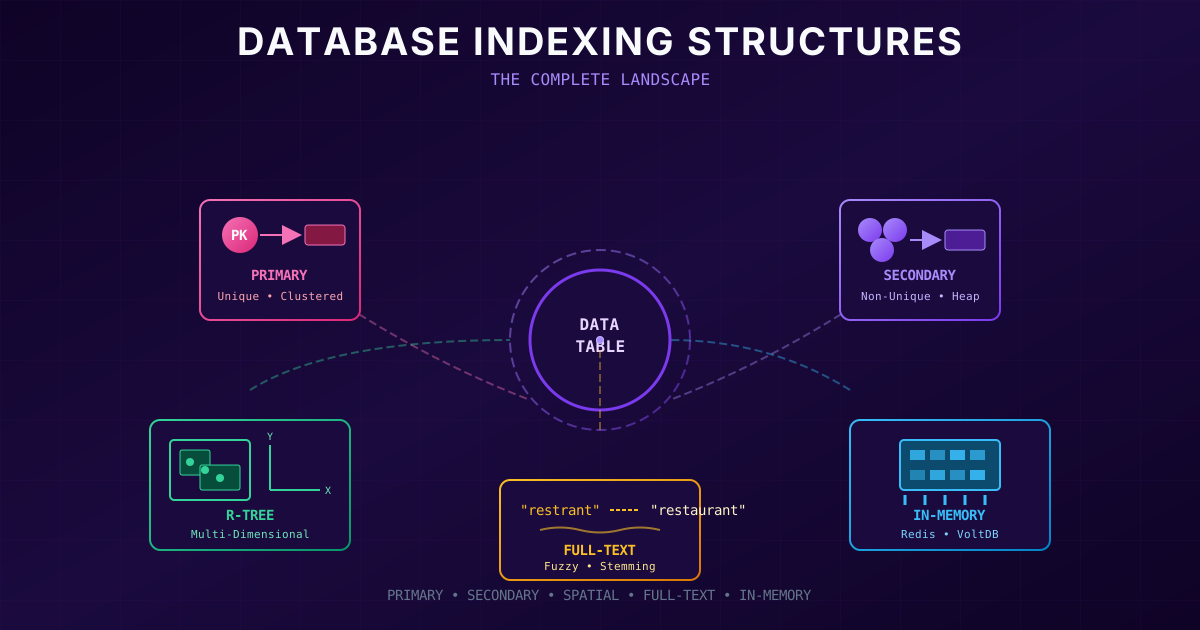
Beyond Simple Key-Value Indexes
So far, we've explored how databases index key-value data using B-Trees and LSM-Trees. But real-world databases need more sophisticated indexing. In this section, we'll explore the full spectrum of indexing structures: secondary indexes, different ways to store data within indexes, multi-column indexes, fuzzy search, and in-memory databases.
Primary Keys vs Secondary Indexes
Every database has a concept of a primary key, a unique identifier for each record. In a relational database, it's the primary key column. In a document database, it's the document ID. In a graph database, it's the vertex ID.
The primary key index lets you find a record when you know its ID. But what if you want to find all orders placed by user #42? Or all products in the "Electronics" category? You need secondary indexes.
The key difference between primary and secondary indexes is uniqueness. A primary key is guaranteed unique, there's exactly one record for each key. A secondary index might have multiple records with the same key value.
Handling Non-Unique Keys
Secondary indexes face the challenge of non-unique keys. For example, many users might share the same city. There are two common solutions:
Option 1: Store a List of IDs
The index value is a list of all matching record IDs. This is similar to how full-text search engines store "postings lists", lists of document IDs that contain each word.
class PostingsListIndex:
    """Secondary index storing lists of matching IDs."""

    def __init__(self):
        self.index = {}  # key -> [id1, id2, id3, ...]

    def add(self, key, record_id):
        if key not in self.index:
            self.index[key] = []
        if record_id not in self.index[key]:
            self.index[key].append(record_id)

    def find(self, key) -> list:
        return self.index.get(key, [])


# Example: Index users by city
city_index = PostingsListIndex()
city_index.add("New York", 101)
city_index.add("New York", 102)
city_index.add("New York", 103)
city_index.add("San Francisco", 201)

print(city_index.find("New York"))  # [101, 102, 103]
Option 2: Make Keys Unique by Appending ID
Combine the secondary key with the record ID to create a unique composite key. For example, instead of indexing "New York", index "New York:101", "New York:102", etc.
class CompositeKeyIndex:
    """Secondary index with unique composite keys."""

    def __init__(self):
        self.index = {}  # (key, id) -> id

    def add(self, key, record_id):
        composite = f"{key}:{record_id}"
        self.index[composite] = record_id

    def find_range(self, key) -> list:
        """Find all records with this key using range scan."""
        prefix = f"{key}:"
        return [
            rid for composite, rid in self.index.items()
            if composite.startswith(prefix)
        ]


# Same example
city_index = CompositeKeyIndex()
city_index.add("New York", 101)
city_index.add("New York", 102)
city_index.add("San Francisco", 201)

print(city_index.find_range("New York"))  # [101, 102]
Both approaches work with B-Trees and LSM-Trees. The choice depends on your query patterns and storage engine.
Where Does the Actual Data Live?
When you look up a key in an index, what do you get back? There are two possibilities:
- A reference to where the actual data is stored
- The actual data itself
This distinction has significant performance implications.
The Heap File Approach
The most common approach is to store all actual data in a heap file, an unordered file where records are simply appended. All indexes (primary and secondary) just store pointers to locations in the heap file.
Advantages of heap files:
- Data is stored in only one place (no duplication)
- Multiple indexes can point to the same data
- Updates that don't change the key can modify data in place
Disadvantage:
- Every index lookup requires an extra "hop" to the heap file
class HeapFile:
    """Simulates a heap file storing actual records."""

    def __init__(self):
        self.data = {}  # location -> record
        self.next_location = 0

    def insert(self, record: dict) -> int:
        """Insert record, return its location."""
        location = self.next_location
        self.data[location] = record
        self.next_location += 100  # Leave gaps for updates
        return location

    def get(self, location: int) -> dict:
        return self.data.get(location)

    def update(self, location: int, record: dict):
        self.data[location] = record


class IndexWithHeapFile:
    """Index that stores pointers to heap file locations."""

    def __init__(self, heap: HeapFile, key_field: str):
        self.heap = heap
        self.key_field = key_field
        self.index = {}  # key -> heap location

    def insert(self, record: dict) -> int:
        location = self.heap.insert(record)
        key = record[self.key_field]
        self.index[key] = location
        return location

    def get(self, key) -> dict:
        location = self.index.get(key)
        if location is None:
            return None
        return self.heap.get(location)  # Extra hop!


# Usage
heap = HeapFile()
primary_index = IndexWithHeapFile(heap, "id")
email_index = IndexWithHeapFile(heap, "email")

# Insert a record
record = {"id": 1, "name": "Alice", "email": "alice@example.com"}
loc = primary_index.insert(record)
email_index.index["alice@example.com"] = loc  # Secondary index points to same location

# Both indexes lead to the same data
print(primary_index.get(1))                     # One hop
print(email_index.index["alice@example.com"])   # Just location
print(heap.get(email_index.index["alice@example.com"]))  # Another hop
Clustered Indexes: Data Inside the Index
Sometimes that extra hop to the heap file is too slow. A clustered index stores the actual row data directly within the index, not just a pointer.
In MySQL's InnoDB, the primary key is always a clustered index. The table data is literally organized by primary key order. Secondary indexes then store the primary key (not a heap location), requiring a lookup in the primary index to find the actual data.
class ClusteredIndex:
    """
    Primary index that stores actual data (like InnoDB).
    Secondary indexes reference primary key.
    """

    def __init__(self):
        self.data = {}  # primary_key -> full record

    def insert(self, record: dict):
        pk = record['id']
        self.data[pk] = record

    def get_by_pk(self, pk) -> dict:
        return self.data.get(pk)


class SecondaryIndexToPK:
    """Secondary index that stores primary keys, not heap locations."""

    def __init__(self, clustered: ClusteredIndex, key_field: str):
        self.clustered = clustered
        self.key_field = key_field
        self.index = {}  # secondary_key -> [pk1, pk2, ...]

    def add(self, record: dict):
        key = record[self.key_field]
        pk = record['id']
        if key not in self.index:
            self.index[key] = []
        self.index[key].append(pk)

    def find(self, key) -> list:
        """Returns actual records, not just IDs."""
        pks = self.index.get(key, [])
        return [self.clustered.get_by_pk(pk) for pk in pks]


# Usage (InnoDB-style)
primary = ClusteredIndex()
city_index = SecondaryIndexToPK(primary, "city")

records = [
    {"id": 1, "name": "Alice", "city": "New York"},
    {"id": 2, "name": "Bob", "city": "San Francisco"},
    {"id": 3, "name": "Carol", "city": "New York"},
]

for r in records:
    primary.insert(r)
    city_index.add(r)

print(city_index.find("New York"))
# [{'id': 1, 'name': 'Alice', ...}, {'id': 3, 'name': 'Carol', ...}]
Covering Indexes: The Middle Ground
A covering index (or "index with included columns") stores some columns in the index, not all. If your query only needs those columns, the index can answer the query directly without accessing the main table, we say the index "covers" the query.
-- PostgreSQL example: covering index
CREATE INDEX idx_user_email_name ON users (email) INCLUDE (name);

-- This query can be answered from the index alone:
SELECT name FROM users WHERE email = 'alice@example.com';

-- This query still needs to access the table:
SELECT * FROM users WHERE email = 'alice@example.com';Multi-Column Indexes
So far, all our indexes have been on a single column. But queries often filter on multiple columns:
SELECT * FROM users WHERE last_name = 'Smith' AND first_name = 'John';Concatenated Indexes
The simplest multi-column index is a concatenated index, we literally concatenate the column values into a single key.
class ConcatenatedIndex:
    """Index on multiple columns by concatenating values."""

    def __init__(self, columns: list):
        self.columns = columns
        self.index = {}  # "val1|val2|val3" -> [ids]

    def _make_key(self, record: dict, prefix_only: int = None) -> str:
        cols = self.columns[:prefix_only] if prefix_only else self.columns
        return "|".join(str(record.get(c, "")) for c in cols)

    def add(self, record: dict, record_id: int):
        key = self._make_key(record)
        if key not in self.index:
            self.index[key] = []
        self.index[key].append(record_id)

    def find_exact(self, **kwargs) -> list:
        """Find records matching all specified columns."""
        key = "|".join(str(kwargs.get(c, "")) for c in self.columns)
        return self.index.get(key, [])

    def find_prefix(self, **kwargs) -> list:
        """Find records matching a prefix of columns."""
        # Build prefix from specified columns (in order!)
        prefix_parts = []
        for col in self.columns:
            if col in kwargs:
                prefix_parts.append(str(kwargs[col]))
            else:
                break
        prefix = "|".join(prefix_parts)

        # Scan for matching prefixes
        results = []
        for key, ids in self.index.items():
            if key.startswith(prefix):
                results.extend(ids)
        return results


# Example: Phone book index (last_name, first_name)
phone_book = ConcatenatedIndex(["last_name", "first_name"])

records = [
    (1, {"last_name": "Smith", "first_name": "John"}),
    (2, {"last_name": "Smith", "first_name": "Jane"}),
    (3, {"last_name": "Smith", "first_name": "Bob"}),
    (4, {"last_name": "Jones", "first_name": "John"}),
]

for rid, record in records:
    phone_book.add(record, rid)

# Can efficiently find:
print(phone_book.find_exact(last_name="Smith", first_name="John"))  # [1]
print(phone_book.find_prefix(last_name="Smith"))  # [1, 2, 3]

# CANNOT efficiently find:
# find_prefix(first_name="John")  # Would need full scan!
The crucial limitation: concatenated indexes only help when you query a prefix of the columns. An index on (last_name, first_name) helps with:
WHERE last_name = 'Smith'✓WHERE last_name = 'Smith' AND first_name = 'John'✓
But NOT with:
WHERE first_name = 'John'✗ (first_name isn't the first column)
Think of it like a phone book: you can find all the Smiths, but you can't easily find all the Johns.
Multi-Dimensional Indexes
Concatenated indexes fall short for certain queries, especially geospatial queries. Consider:
SELECT * FROM restaurants
WHERE latitude BETWEEN 51.49 AND 51.51
  AND longitude BETWEEN -0.12 AND -0.10;
A regular index on (latitude, longitude) would find all restaurants in a latitude range, then scan through them to filter by longitude. Not efficient!
What we need is an index that understands both dimensions simultaneously.
R-Trees for Spatial Data
R-Trees are specialized indexes for multi-dimensional data. They organize data into nested bounding boxes, allowing efficient queries like "find all points within this rectangle."
from dataclasses import dataclass
from typing import List, Optional

@dataclass
class Point:
    x: float  # longitude
    y: float  # latitude
    data: dict

@dataclass
class Rectangle:
    x_min: float
    y_min: float
    x_max: float
    y_max: float

    def contains(self, point: Point) -> bool:
        return (self.x_min <= point.x <= self.x_max and
                self.y_min <= point.y <= self.y_max)

    def intersects(self, other: 'Rectangle') -> bool:
        return not (self.x_max < other.x_min or
                   self.x_min > other.x_max or
                   self.y_max < other.y_min or
                   self.y_min > other.y_max)


class SimpleRTreeNode:
    """Simplified R-Tree node for demonstration."""

    def __init__(self, is_leaf: bool = True):
        self.is_leaf = is_leaf
        self.bounds: Optional[Rectangle] = None
        self.children: List = []  # Points if leaf, Nodes if internal

    def search(self, query: Rectangle) -> List[Point]:
        """Find all points within the query rectangle."""
        results = []

        # Skip if query doesn't intersect our bounds
        if self.bounds and not self.bounds.intersects(query):
            return results

        if self.is_leaf:
            for point in self.children:
                if query.contains(point):
                    results.append(point)
        else:
            for child in self.children:
                results.extend(child.search(query))

        return results


# Example: Restaurant search
restaurants = [
    Point(-0.11, 51.50, {"name": "Pizza Place"}),
    Point(-0.10, 51.51, {"name": "Sushi Bar"}),
    Point(-0.15, 51.48, {"name": "Burger Joint"}),
    Point(-0.09, 51.49, {"name": "Taco Shop"}),
]

# Simple leaf node containing all restaurants
node = SimpleRTreeNode(is_leaf=True)
node.children = restaurants
node.bounds = Rectangle(-0.20, 51.45, -0.05, 51.55)

# Query: Find restaurants in a specific area
query = Rectangle(-0.12, 51.49, -0.08, 51.52)
results = node.search(query)

print("Restaurants in area:")
for r in results:
    print(f"  {r.data['name']} at ({r.x}, {r.y})")
Beyond Geography: Multi-Dimensional Queries
R-Trees aren't just for maps! Any multi-dimensional query can benefit:
- E-commerce: Search products by (price, rating, color_rgb)
- Weather data: Query by (date, temperature, humidity)
- Scientific data: Search by any combination of measurements
Full-Text Search and Fuzzy Indexes
All the indexes we've discussed so far work with exact values. But what about searching for text that's similar to what the user typed? What about typos, synonyms, or partial matches?
This is the domain of full-text search engines like Elasticsearch, Solr (built on Lucene), and PostgreSQL's full-text search.
The Challenge of Fuzzy Matching
Fuzzy search needs to handle:
- Typos: "restrant" should match "restaurant"
- Synonyms: "automobile" should match "car"
- Stemming: "running", "runs", "ran" should all match "run"
- Proximity: Find documents where "data" and "intensive" appear near each other
Levenshtein Distance (Edit Distance)
The Levenshtein distance between two strings is the minimum number of single-character edits (insertions, deletions, substitutions) needed to transform one into the other.
def levenshtein_distance(s1: str, s2: str) -> int:
    """
    Calculate edit distance between two strings.

    Examples:
    - "cat" → "car" = 1 (substitute t→r)
    - "cat" → "cats" = 1 (insert s)
    - "kitten" → "sitting" = 3
    """
    if len(s1) < len(s2):
        return levenshtein_distance(s2, s1)

    if len(s2) == 0:
        return len(s1)

    previous_row = range(len(s2) + 1)
    for i, c1 in enumerate(s1):
        current_row = [i + 1]
        for j, c2 in enumerate(s2):
            # Cost is 0 if characters match, 1 otherwise
            insertions = previous_row[j + 1] + 1
            deletions = current_row[j] + 1
            substitutions = previous_row[j] + (c1 != c2)
            current_row.append(min(insertions, deletions, substitutions))
        previous_row = current_row

    return previous_row[-1]


# Examples
print(levenshtein_distance("restaurant", "restrant"))  # 2
print(levenshtein_distance("cat", "car"))              # 1
print(levenshtein_distance("kitten", "sitting"))       # 3


def fuzzy_search(query: str, terms: list, max_distance: int = 2) -> list:
    """Find terms within max_distance edits of query."""
    return [
        (term, levenshtein_distance(query, term))
        for term in terms
        if levenshtein_distance(query, term) <= max_distance
    ]


# Search with typos
dictionary = ["restaurant", "rest", "rest stop", "restful", "restore"]
print(fuzzy_search("restrant", dictionary))
# [('restaurant', 2), ('rest', 4)... filtered to distance ≤ 2]
How Lucene Handles Fuzzy Search
Lucene (the engine behind Elasticsearch) uses a clever structure: a finite state automaton built from its term dictionary. This automaton can be transformed into a Levenshtein automaton that efficiently finds all terms within a given edit distance of the query.
The key insight: instead of comparing the query against every term in the dictionary (slow!), the automaton traverses only the relevant paths.
In-Memory Databases
Everything we've discussed so far optimizes for one constraint: disk is slow. B-Trees minimize disk seeks. LSM-Trees optimize for sequential writes. But what if we just... kept everything in RAM?
Why In-Memory Databases?
RAM has become cheaper. Many datasets fit entirely in memory. And the performance gains are substantial, not because RAM is faster to read (the OS caches frequently-accessed disk data in RAM anyway), but because:
- No encoding overhead: Data can stay in natural in-memory formats
- No I/O coordination: No need to carefully layout data for disk access
- Complex data structures: Can use priority queues, sets, graphs directly
But What About Durability?
If everything is in RAM, what happens when the power goes out? In-memory databases handle this several ways:
class DurableInMemoryDB:
    """
    In-memory database with durability options.
    """

    def __init__(self, durability_mode: str = "wal"):
        self.data = {}  # All data in memory
        self.durability_mode = durability_mode
        self.wal = []  # Write-ahead log

    def set(self, key: str, value: any):
        # Durability first!
        if self.durability_mode == "wal":
            self._write_to_wal("SET", key, value)
        elif self.durability_mode == "sync":
            self._sync_to_replica(key, value)

        # Then update memory
        self.data[key] = value

    def _write_to_wal(self, op: str, key: str, value: any):
        """Write operation to append-only log on disk."""
        # In real implementation, this would write to disk
        self.wal.append((op, key, value))
        print(f"WAL: {op} {key}")

    def _sync_to_replica(self, key: str, value: any):
        """Synchronously replicate to another machine."""
        print(f"Replicating {key} to replica...")

    def recover(self):
        """Rebuild state from WAL after crash."""
        print("Recovering from WAL...")
        for op, key, value in self.wal:
            if op == "SET":
                self.data[key] = value
            elif op == "DELETE":
                self.data.pop(key, None)
        print(f"Recovered {len(self.data)} keys")


# Example
db = DurableInMemoryDB(durability_mode="wal")
db.set("user:1", {"name": "Alice"})
db.set("user:2", {"name": "Bob"})

# After crash: recover from WAL
db2 = DurableInMemoryDB()
db2.wal = db.wal  # Simulating reading WAL from disk
db2.recover()
Real In-Memory Databases
| Database | Durability | Use Case | | ------------ | ------------------------------- | --------------------------- | | Memcached| None (cache only) | Caching layer | | Redis | Async disk writes, replication | Cache + data structure server | | VoltDB | Sync replication | OLTP | | MemSQL | Disk snapshots + replication | Analytics | | SAP HANA | Disk persistence | Enterprise analytics |
The Anti-Caching Approach
What if your data is bigger than RAM? Traditional databases start with disk and cache in memory. The anti-caching approach flips this: start with memory, and spill to disk only when necessary.
- Keep hot data in memory
- Evict cold data to disk (like LRU cache)
- Load from disk on-demand when accessed
This gives you in-memory performance for hot data while supporting datasets larger than RAM.
class AntiCacheDB:
    """
    In-memory database that spills to disk when memory is full.
    Hot data stays in memory; cold data goes to disk.
    """

    def __init__(self, max_memory_items: int = 1000):
        self.max_memory_items = max_memory_items
        self.memory = {}  # Hot data
        self.disk = {}    # Cold data (simulated)
        self.access_order = []  # For LRU eviction

    def get(self, key: str):
        if key in self.memory:
            # Hot path: already in memory
            self._touch(key)
            return self.memory[key]

        if key in self.disk:
            # Cold path: load from disk into memory
            value = self.disk.pop(key)
            self._add_to_memory(key, value)
            return value

        return None

    def set(self, key: str, value: any):
        self._add_to_memory(key, value)

    def _add_to_memory(self, key: str, value: any):
        # Evict if necessary
        while len(self.memory) >= self.max_memory_items:
            self._evict_coldest()

        self.memory[key] = value
        self._touch(key)

    def _touch(self, key: str):
        """Mark key as recently used."""
        if key in self.access_order:
            self.access_order.remove(key)
        self.access_order.append(key)

    def _evict_coldest(self):
        """Move least recently used item to disk."""
        if self.access_order:
            cold_key = self.access_order.pop(0)
            self.disk[cold_key] = self.memory.pop(cold_key)
            print(f"Evicted {cold_key} to disk")

    def stats(self):
        print(f"Memory: {len(self.memory)} items")
        print(f"Disk: {len(self.disk)} items")
Key Takeaways
| Concept | Description | | -------------------- | ----------------------------------------------------------------- | | Secondary Index | Index on non-primary-key columns; keys may not be unique | | Heap File | Unordered file storing actual data; indexes store pointers | | Clustered Index | Data stored within the index itself (e.g., InnoDB primary key) | | Covering Index | Index storing some columns, can answer queries without table access | | Concatenated Index | Multi-column index by concatenating values; prefix queries only | | R-Tree | Multi-dimensional index for spatial and range queries | | Fuzzy Index | Supports approximate matching (typos, synonyms, stemming) | | In-Memory DB | All data in RAM; various durability strategies |
Understanding these indexing structures helps you choose the right database features for your application. Need geospatial queries? Look for R-tree support. Need fuzzy text search? Consider Elasticsearch. Working with a dataset that fits in memory? An in-memory database might be the right choice.