Column-Oriented Storage
A deep dive into column-oriented storage - the secret weapon of data warehouses. Learn how columnar databases achieve massive performance gains through smart data layout, compression, and vectorized processing.
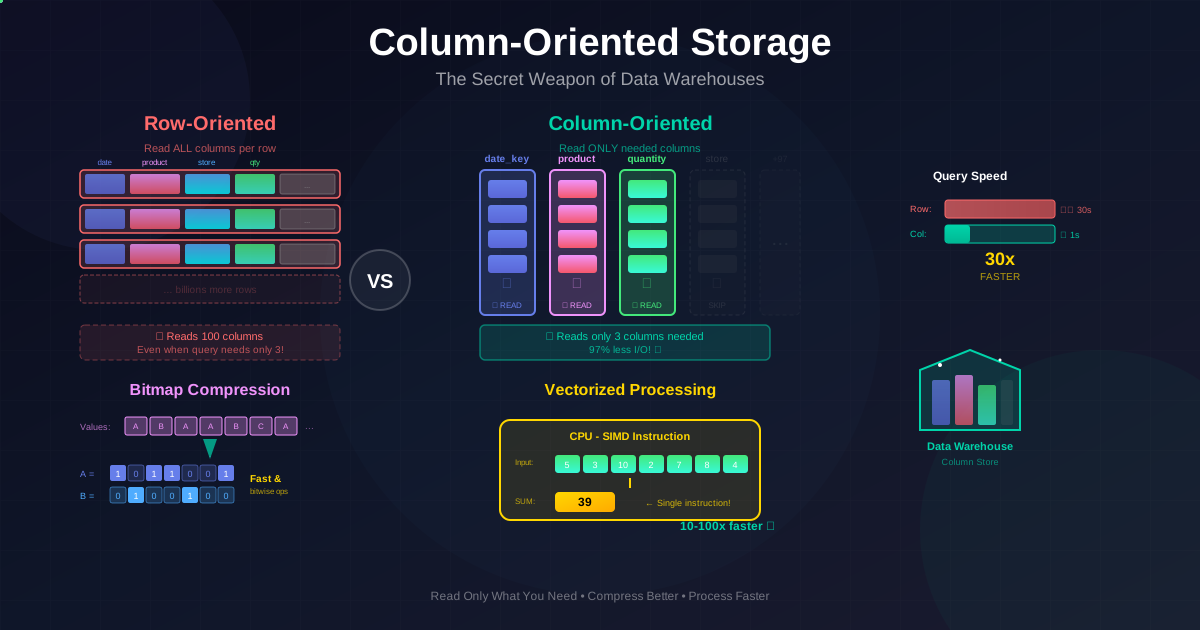
The Secret Weapon of Data Warehouses
Imagine you have a fact table with 100 columns and 1 billion rows. A typical analytics query might look like this:
SELECT dim_date.weekday, dim_product.category, SUM(fact_sales.quantity)
FROM fact_sales
JOIN dim_date ON fact_sales.date_key = dim_date.date_key
JOIN dim_product ON fact_sales.product_sk = dim_product.product_sk
WHERE dim_date.year = 2013
  AND dim_product.category IN ('Fresh fruit', 'Candy')
GROUP BY dim_date.weekday, dim_product.category;
This query only needs 3 columns from the fact table: date_key, product_sk, and quantity. But in a traditional row-oriented database, you'd have to read all 100 columns for every matching row. That's reading 97 columns of data you don't even need!
This inefficiency is the motivation behind column-oriented storage, the storage layout that makes data warehouses blazingly fast for analytics.
Row-Oriented vs Column-Oriented Storage
In a traditional row-oriented database (like MySQL or PostgreSQL), data is stored one row at a time. All columns for a single row are stored together on disk:
Row 1: [date_key, product_sk, store_sk, customer_sk, quantity, price, discount, ...]
Row 2: [date_key, product_sk, store_sk, customer_sk, quantity, price, discount, ...]
Row 3: [date_key, product_sk, store_sk, customer_sk, quantity, price, discount, ...]
In a column-oriented database, data is stored one column at a time. All values for a single column are stored together:
date_key file:    [2013-01-15, 2013-01-15, 2013-01-16, 2013-01-16, ...]
product_sk file:  [29, 30, 31, 68, ...]
quantity file:    [5, 3, 10, 2, ...]
price file:       [100, 50, 25, 75, ...]
The key insight: if your query only needs 3 columns, you only read 3 files, not all 100.
How Column Storage Works
Let's build a simple column store to understand the mechanics:
from typing import List, Dict, Any
import struct

class ColumnStore:
    """
    A simple column-oriented storage engine.
    Each column is stored in a separate 'file' (simulated as list).
    """

    def __init__(self, schema: List[str]):
        self.schema = schema  # Column names
        self.columns: Dict[str, List[Any]] = {col: [] for col in schema}
        self.row_count = 0

    def insert_row(self, row: Dict[str, Any]):
        """Insert a row by appending to each column file."""
        for col in self.schema:
            self.columns[col].append(row.get(col))
        self.row_count += 1

    def insert_batch(self, rows: List[Dict[str, Any]]):
        """Bulk insert for efficiency."""
        for row in rows:
            self.insert_row(row)

    def read_columns(self, column_names: List[str]) -> Dict[str, List[Any]]:
        """
        Read only the specified columns.
        This is the key advantage: we skip columns we don't need!
        """
        return {col: self.columns[col] for col in column_names}

    def query(self, select_cols: List[str], where_col: str = None,
              where_value: Any = None) -> List[Dict[str, Any]]:
        """
        Simple query: SELECT select_cols WHERE where_col = where_value
        """
        # Only read columns we need for the query
        needed_cols = set(select_cols)
        if where_col:
            needed_cols.add(where_col)

        data = self.read_columns(list(needed_cols))

        results = []
        for i in range(self.row_count):
            # Apply filter
            if where_col and data[where_col][i] != where_value:
                continue

            # Build result row from only selected columns
            result = {col: data[col][i] for col in select_cols}
            results.append(result)

        return results


# Example: Create a fact table
schema = ['date_key', 'product_sk', 'store_sk', 'customer_sk',
          'quantity', 'price', 'discount', 'tax', 'total']

store = ColumnStore(schema)

# Insert some sales data
sales = [
    {'date_key': 20130115, 'product_sk': 29, 'store_sk': 1,
     'customer_sk': 100, 'quantity': 5, 'price': 100,
     'discount': 0, 'tax': 8, 'total': 508},
    {'date_key': 20130115, 'product_sk': 30, 'store_sk': 2,
     'customer_sk': 101, 'quantity': 3, 'price': 50,
     'discount': 5, 'tax': 4, 'total': 149},
    {'date_key': 20130116, 'product_sk': 29, 'store_sk': 1,
     'customer_sk': 102, 'quantity': 10, 'price': 100,
     'discount': 10, 'tax': 15, 'total': 1005},
]

store.insert_batch(sales)

# Query: Only read date_key, product_sk, quantity
# In row-store: would read ALL 9 columns
# In column-store: only reads 3 columns!
result = store.query(['date_key', 'product_sk', 'quantity'])
print(f"Read only 3 columns instead of {len(schema)}!")
for row in result:
    print(row)
Reconstructing Rows
The critical rule in column storage: all column files must keep rows in the same order. The 23rd value in the date_key file belongs to the same row as the 23rd value in the product_sk file.
Column Compression: Making It Even Faster
Column storage has another huge advantage: columns compress extremely well.
Why? Because values in a column are often repetitive. Think about a country column in a billion-row table, there are only ~200 distinct countries. Or a product_category column with maybe 50 categories. This repetition is perfect for compression.
Bitmap Encoding
One of the most effective compression techniques for data warehouses is bitmap encoding. For each distinct value in a column, we create a bitmap (a sequence of 1s and 0s) indicating which rows have that value.
from typing import List, Dict, Set

class BitmapIndex:
    """
    Bitmap index for a column with low cardinality.
    Perfect for columns like: country, category, status, year.
    """

    def __init__(self, column_data: List[Any]):
        self.row_count = len(column_data)
        self.bitmaps: Dict[Any, List[int]] = {}

        # Build bitmap for each distinct value
        for row_idx, value in enumerate(column_data):
            if value not in self.bitmaps:
                self.bitmaps[value] = [0] * self.row_count
            self.bitmaps[value][row_idx] = 1

    def get_bitmap(self, value: Any) -> List[int]:
        """Get bitmap for a specific value."""
        return self.bitmaps.get(value, [0] * self.row_count)

    def query_equals(self, value: Any) -> List[int]:
        """WHERE column = value: Return matching row indices."""
        bitmap = self.get_bitmap(value)
        return [i for i, bit in enumerate(bitmap) if bit == 1]

    def query_in(self, values: List[Any]) -> List[int]:
        """
        WHERE column IN (val1, val2, val3)
        Combine bitmaps with OR operation.
        """
        result = [0] * self.row_count

        for value in values:
            bitmap = self.get_bitmap(value)
            # Bitwise OR
            result = [r | b for r, b in zip(result, bitmap)]

        return [i for i, bit in enumerate(result) if bit == 1]

    def query_and(self, other_bitmap: List[int]) -> List[int]:
        """
        Combine with another bitmap using AND.
        Useful for: WHERE product_sk = 29 AND store_sk = 3
        """
        my_rows = set(self.query_equals(29))  # Example
        other_rows = set(i for i, b in enumerate(other_bitmap) if b == 1)
        return list(my_rows & other_rows)


# Example: Product categories
product_categories = ['Fruit', 'Candy', 'Fruit', 'Dairy', 'Candy',
                      'Fruit', 'Dairy', 'Candy', 'Fruit', 'Candy']

bitmap_idx = BitmapIndex(product_categories)

# Query: WHERE category = 'Fruit'
fruit_rows = bitmap_idx.query_equals('Fruit')
print(f"Fruit rows: {fruit_rows}")  # [0, 2, 5, 8]

# Query: WHERE category IN ('Fruit', 'Candy')
fruit_candy_rows = bitmap_idx.query_in(['Fruit', 'Candy'])
print(f"Fruit or Candy rows: {fruit_candy_rows}")  # [0, 1, 2, 4, 5, 7, 8, 9]
Run-Length Encoding (RLE)
When bitmaps are sparse (mostly zeros), we can compress them further with run-length encoding. Instead of storing 0,0,0,0,0,0,0,1,0,0,0,0, we store 7 zeros, 1 one, 4 zeros.
def run_length_encode(bitmap: List[int]) -> List[tuple]:
    """
    Compress sparse bitmap using run-length encoding.

    Input:  [0,0,0,0,0,0,0,1,0,0,0,0,1,0,0]
    Output: [(0,7), (1,1), (0,4), (1,1), (0,2)]
            Meaning: 7 zeros, 1 one, 4 zeros, 1 one, 2 zeros
    """
    if not bitmap:
        return []

    encoded = []
    current_value = bitmap[0]
    count = 1

    for bit in bitmap[1:]:
        if bit == current_value:
            count += 1
        else:
            encoded.append((current_value, count))
            current_value = bit
            count = 1

    encoded.append((current_value, count))
    return encoded


def run_length_decode(encoded: List[tuple]) -> List[int]:
    """Decompress run-length encoded bitmap."""
    result = []
    for value, count in encoded:
        result.extend([value] * count)
    return result


# Example: Sparse bitmap for a rare product
sparse_bitmap = [0]*100 + [1] + [0]*50 + [1] + [0]*200

# Uncompressed: 353 integers
print(f"Uncompressed size: {len(sparse_bitmap)} values")

# Compressed: Just a few tuples!
compressed = run_length_encode(sparse_bitmap)
print(f"Compressed: {compressed}")
print(f"Compressed size: {len(compressed)} tuples")

# Verify it works
decompressed = run_length_decode(compressed)
assert decompressed == sparse_bitmap
print("Compression verified!")Vectorized Processing: CPU-Level Optimization
Column storage isn't just about disk I/O, it's also about making the CPU happy.
Modern CPUs have SIMD (Single Instruction, Multiple Data) instructions that can process multiple values in a single operation. Column storage is perfect for this because:
- Values of the same type are stored contiguously
- Compressed data fits in CPU cache
- Operations can be applied to entire chunks at once
import array
import time

def traditional_sum(values: list) -> int:
    """Traditional row-by-row processing."""
    total = 0
    for value in values:
        total += value
    return total


def vectorized_sum(values: array.array) -> int:
    """
    Simulated vectorized processing using Python's array.
    Real systems use NumPy or C/SIMD instructions.
    """
    # In real systems, this would be a single SIMD instruction
    # processing 4, 8, or 16 values at once
    return sum(values)


# Benchmark
data_list = list(range(1_000_000))
data_array = array.array('i', range(1_000_000))

# Traditional
start = time.time()
result1 = traditional_sum(data_list)
traditional_time = time.time() - start

# Vectorized (simulated)
start = time.time()
result2 = vectorized_sum(data_array)
vectorized_time = time.time() - start

print(f"Traditional: {traditional_time:.4f}s")
print(f"Vectorized:  {vectorized_time:.4f}s")
print(f"Speedup:     {traditional_time/vectorized_time:.1f}x")
How Bitwise Operations Enable Fast Filtering
With bitmap indexes, we can filter millions of rows using fast bitwise operations:
def fast_bitmap_filter(bitmap1: int, bitmap2: int, operation: str) -> int:
    """
    Filter using bitwise operations on compressed bitmaps.
    Way faster than checking each row individually!
    """
    if operation == 'AND':
        return bitmap1 & bitmap2
    elif operation == 'OR':
        return bitmap1 | bitmap2
    elif operation == 'NOT':
        return ~bitmap1
    else:
        raise ValueError(f"Unknown operation: {operation}")


# Example: WHERE product_sk IN (30, 68, 69) AND store_sk = 3
# Each bitmap represents 8 rows (in reality, would be millions)

product_30_bitmap = 0b01000001  # Rows 0 and 6 have product 30
product_68_bitmap = 0b00010000  # Row 4 has product 68
product_69_bitmap = 0b00000100  # Row 2 has product 69

store_3_bitmap =    0b01010101  # Rows 0, 2, 4, 6 are in store 3

# Step 1: OR the product bitmaps
products_bitmap = (product_30_bitmap | product_68_bitmap | product_69_bitmap)
print(f"Products (30|68|69): {bin(products_bitmap)}")  # 0b01010101

# Step 2: AND with store bitmap
result = products_bitmap & store_3_bitmap
print(f"Final result:        {bin(result)}")  # 0b01010101

# Count matching rows
matching_rows = bin(result).count('1')
print(f"Matching rows: {matching_rows}")
Sort Order in Column Storage
In a column store, rows can be stored in any order, but choosing a smart sort order can dramatically improve query performance.
Why Sort Order Matters
If we sort the data by date_key, then:
- All January 2013 data is stored together
- A query filtering by date can skip entire sections of the file
- The sorted column compresses extremely well (long runs of same value)
Multi-Column Sort Order
You can sort by multiple columns. For example, first by date_key, then by product_sk within each date:
class SortedColumnStore:
    """
    Column store with configurable sort order.
    """

    def __init__(self, schema: List[str], sort_keys: List[str]):
        self.schema = schema
        self.sort_keys = sort_keys
        self.columns: Dict[str, List[Any]] = {col: [] for col in schema}
        self.row_count = 0

    def insert_batch(self, rows: List[Dict[str, Any]]):
        """Insert and maintain sort order."""
        # Sort rows by sort keys
        sorted_rows = sorted(rows, key=lambda r: tuple(r[k] for k in self.sort_keys))

        for row in sorted_rows:
            for col in self.schema:
                self.columns[col].append(row.get(col))
            self.row_count += 1

    def analyze_compression(self, column: str) -> Dict[str, Any]:
        """
        Analyze how well a column compresses.
        Sorted columns have longer runs of repeated values.
        """
        data = self.columns[column]
        runs = []
        current_value = data[0] if data else None
        run_length = 1

        for value in data[1:]:
            if value == current_value:
                run_length += 1
            else:
                runs.append(run_length)
                current_value = value
                run_length = 1

        if data:
            runs.append(run_length)

        return {
            'total_values': len(data),
            'distinct_values': len(set(data)),
            'num_runs': len(runs),
            'avg_run_length': sum(runs) / len(runs) if runs else 0,
            'max_run_length': max(runs) if runs else 0,
        }


# Example: Compare sorted vs unsorted
schema = ['date_key', 'product_sk', 'quantity']

# Unsorted store
unsorted_store = SortedColumnStore(schema, [])
unsorted_data = [
    {'date_key': 20130115, 'product_sk': 30, 'quantity': 5},
    {'date_key': 20130110, 'product_sk': 29, 'quantity': 3},
    {'date_key': 20130115, 'product_sk': 29, 'quantity': 10},
    {'date_key': 20130110, 'product_sk': 30, 'quantity': 2},
    {'date_key': 20130115, 'product_sk': 29, 'quantity': 7},
]

# Sorted store (by date, then product)
sorted_store = SortedColumnStore(schema, ['date_key', 'product_sk'])
sorted_store.insert_batch(unsorted_data)

print("Sorted by date_key, product_sk:")
for i in range(sorted_store.row_count):
    print(f"  {sorted_store.columns['date_key'][i]}, "
          f"{sorted_store.columns['product_sk'][i]}, "
          f"{sorted_store.columns['quantity'][i]}")

# Compression analysis
stats = sorted_store.analyze_compression('date_key')
print(f"\ndate_key compression stats: {stats}")
Multiple Sort Orders (C-Store/Vertica Approach)
Here's a clever idea: since data needs to be replicated for fault tolerance anyway, why not store different replicas with different sort orders?
- Replica 1: Sorted by (date, product)
- Replica 2: Sorted by (product, store)
- Replica 3: Sorted by (customer, date)
Then the query optimizer can choose whichever replica works best for each query.
Writing to Column-Oriented Storage
Column storage is optimized for reads, but what about writes? Here's the challenge:
- In row storage, inserting a row means writing to one location
- In column storage, inserting a row means updating every column file
- If the data is sorted, insertion might require rewriting everything!
The solution? Use LSM-Trees (which we covered earlier).
class LSMColumnStore:
    """
    Column store using LSM-tree approach for writes.
    Recent writes stay in memory; periodically flushed to columnar files.
    """

    def __init__(self, schema: List[str]):
        self.schema = schema
        # In-memory buffer (row-oriented for easy writes)
        self.memtable: List[Dict[str, Any]] = []
        self.memtable_threshold = 1000

        # On-disk column files (simulated)
        self.disk_columns: Dict[str, List[Any]] = {col: [] for col in schema}
        self.disk_row_count = 0

    def insert(self, row: Dict[str, Any]):
        """Write to memory first (fast!)."""
        self.memtable.append(row)

        if len(self.memtable) >= self.memtable_threshold:
            self._flush_to_disk()

    def _flush_to_disk(self):
        """Convert memtable to columnar format and flush."""
        print(f"Flushing {len(self.memtable)} rows to column files...")

        # Sort memtable (optional, based on sort keys)
        sorted_rows = sorted(self.memtable,
                            key=lambda r: r.get('date_key', 0))

        # Convert to columnar and append to disk files
        for row in sorted_rows:
            for col in self.schema:
                self.disk_columns[col].append(row.get(col))

        self.disk_row_count += len(self.memtable)
        self.memtable = []

    def query(self, select_cols: List[str]) -> List[Dict[str, Any]]:
        """
        Query must check both disk AND memtable.
        Query optimizer hides this complexity from user.
        """
        results = []

        # Read from disk columns
        for i in range(self.disk_row_count):
            row = {col: self.disk_columns[col][i] for col in select_cols}
            results.append(row)

        # Read from memtable
        for row in self.memtable:
            results.append({col: row.get(col) for col in select_cols})

        return results


# Example
store = LSMColumnStore(['date_key', 'product_sk', 'quantity'])

# Writes go to memory (fast)
for i in range(100):
    store.insert({'date_key': 20130115 + i % 10,
                  'product_sk': 29 + i % 5,
                  'quantity': i})

print(f"Memtable has {len(store.memtable)} rows")
print(f"Disk has {store.disk_row_count} rows")

# Force flush
store._flush_to_disk()
print(f"After flush: Disk has {store.disk_row_count} rows")
Materialized Views and Data Cubes
Analytics queries often compute the same aggregations repeatedly. Instead of recalculating every time, we can precompute and cache the results.
Materialized Views
A materialized view is a query result that's stored on disk. Unlike a regular view (which is just a saved query), a materialized view contains actual data.
class MaterializedView:
    """
    Precomputed query result stored for fast access.
    """

    def __init__(self, name: str, query_func, source_data):
        self.name = name
        self.query_func = query_func
        self.source_data = source_data
        self.cached_result = None
        self.last_refreshed = None

    def refresh(self):
        """Recompute the materialized view."""
        import datetime
        print(f"Refreshing materialized view: {self.name}")
        self.cached_result = self.query_func(self.source_data)
        self.last_refreshed = datetime.datetime.now()

    def get(self):
        """Get cached result (fast!)."""
        if self.cached_result is None:
            self.refresh()
        return self.cached_result


# Example: Materialized view of sales by product
def sales_by_product_query(sales_data):
    """Expensive aggregation query."""
    result = {}
    for sale in sales_data:
        product = sale['product_sk']
        result[product] = result.get(product, 0) + sale['quantity']
    return result


sales = [
    {'product_sk': 29, 'quantity': 10},
    {'product_sk': 30, 'quantity': 5},
    {'product_sk': 29, 'quantity': 7},
    {'product_sk': 30, 'quantity': 3},
]

# Create materialized view
mv = MaterializedView('sales_by_product', sales_by_product_query, sales)

# First access: computes the query
result1 = mv.get()
print(f"Result: {result1}")

# Second access: instant (cached)!
result2 = mv.get()
print(f"Cached result: {result2}")
Data Cubes (OLAP Cubes)
A data cube is a special kind of materialized view that precomputes aggregates across multiple dimensions.
Imagine a 2D table where rows are dates and columns are products. Each cell contains the SUM of sales for that date-product combination. You can then sum across rows (total per product) or columns (total per date).
from typing import List, Dict, Tuple
from collections import defaultdict

class DataCube:
    """
    A 2D data cube with precomputed aggregates.
    Real cubes can have 5+ dimensions (date, product, store, customer, promo).
    """

    def __init__(self, dim1_name: str, dim2_name: str, measure_name: str):
        self.dim1_name = dim1_name
        self.dim2_name = dim2_name
        self.measure_name = measure_name

        # The cube: dim1 -> dim2 -> aggregated value
        self.cube: Dict[Any, Dict[Any, float]] = defaultdict(lambda: defaultdict(float))

        # Precomputed totals
        self.dim1_totals: Dict[Any, float] = defaultdict(float)
        self.dim2_totals: Dict[Any, float] = defaultdict(float)
        self.grand_total = 0.0

    def build_from_facts(self, facts: List[Dict[str, Any]]):
        """Build cube from raw fact data."""
        for fact in facts:
            dim1_val = fact[self.dim1_name]
            dim2_val = fact[self.dim2_name]
            measure = fact[self.measure_name]

            # Aggregate into cube cell
            self.cube[dim1_val][dim2_val] += measure

            # Update totals
            self.dim1_totals[dim1_val] += measure
            self.dim2_totals[dim2_val] += measure
            self.grand_total += measure

        print(f"Built cube with {len(self.cube)} × "
              f"{len(self.dim2_totals)} cells")

    def get_cell(self, dim1_val, dim2_val) -> float:
        """Get precomputed aggregate for specific combination."""
        return self.cube[dim1_val][dim2_val]

    def get_dim1_total(self, dim1_val) -> float:
        """Total across all dim2 values for this dim1."""
        return self.dim1_totals[dim1_val]

    def get_dim2_total(self, dim2_val) -> float:
        """Total across all dim1 values for this dim2."""
        return self.dim2_totals[dim2_val]

    def get_grand_total(self) -> float:
        """Overall total."""
        return self.grand_total

    def print_cube(self):
        """Display the cube as a grid."""
        dim1_vals = sorted(self.cube.keys())
        dim2_vals = sorted(self.dim2_totals.keys())

        # Header
        header = f"{self.dim1_name:12} |"
        for d2 in dim2_vals:
            header += f" {str(d2):8} |"
        header += " TOTAL"
        print(header)
        print("-" * len(header))

        # Rows
        for d1 in dim1_vals:
            row = f"{str(d1):12} |"
            for d2 in dim2_vals:
                row += f" {self.cube[d1][d2]:8.0f} |"
            row += f" {self.dim1_totals[d1]:8.0f}"
            print(row)

        # Footer
        print("-" * len(header))
        footer = f"{'TOTAL':12} |"
        for d2 in dim2_vals:
            footer += f" {self.dim2_totals[d2]:8.0f} |"
        footer += f" {self.grand_total:8.0f}"
        print(footer)


# Example: Build a sales cube
facts = [
    {'date': '2024-01-01', 'product': 'A', 'quantity': 100},
    {'date': '2024-01-01', 'product': 'B', 'quantity': 50},
    {'date': '2024-01-01', 'product': 'C', 'quantity': 75},
    {'date': '2024-01-02', 'product': 'A', 'quantity': 150},
    {'date': '2024-01-02', 'product': 'B', 'quantity': 30},
    {'date': '2024-01-02', 'product': 'C', 'quantity': 80},
    {'date': '2024-01-03', 'product': 'A', 'quantity': 80},
    {'date': '2024-01-03', 'product': 'B', 'quantity': 60},
    {'date': '2024-01-03', 'product': 'C', 'quantity': 90},
]

cube = DataCube('date', 'product', 'quantity')
cube.build_from_facts(facts)

print("\nData Cube:")
cube.print_cube()

print("\n--- Fast Queries (precomputed!) ---")
print(f"Sales of Product A: {cube.get_dim2_total('A')}")
print(f"Sales on 2024-01-02: {cube.get_dim1_total('2024-01-02')}")
print(f"Product B on Jan 3: {cube.get_cell('2024-01-03', 'B')}")
print(f"Grand total: {cube.get_grand_total()}")
Trade-offs of Data Cubes
Columnar vs Row Storage: When to Use What
| Aspect | Row-Oriented | Column-Oriented | |--------|--------------|-----------------| | Best for | OLTP (transactions) | OLAP (analytics) | | Read pattern | Fetch whole rows | Fetch specific columns | | Write pattern | Single row inserts | Batch inserts | | Compression | Moderate | Excellent | | CPU efficiency | Function calls per row | Vectorized processing | | Examples | PostgreSQL, MySQL | ClickHouse, Redshift, Parquet |
Key Takeaways
| Concept | Description | |---------|-------------| | Column Storage | Store each column in separate file; read only what you need | | Bitmap Encoding | Represent column as bitmaps; enable fast bitwise operations | | Run-Length Encoding | Compress sparse bitmaps by storing run lengths | | Vectorized Processing | Process column chunks using SIMD CPU instructions | | Sort Order | Sorting improves compression and enables range skipping | | LSM for Writes | Buffer writes in memory; merge to columnar files periodically | | Materialized View | Precomputed query result stored on disk | | Data Cube | Multi-dimensional grid of precomputed aggregates |
Column-oriented storage is one of the most important innovations in database technology for analytics. By fundamentally rethinking how data is laid out on disk, column stores achieve dramatic improvements in both I/O efficiency and CPU utilization for analytical workloads. Combined with compression and vectorized processing, they enable queries over billions of rows to complete in seconds rather than hours.