Comparing B-Trees and LSM-Trees
A comprehensive comparison of B-Trees and LSM-Trees - understanding write amplification, performance trade-offs, and when to choose each storage engine architecture for your workload.
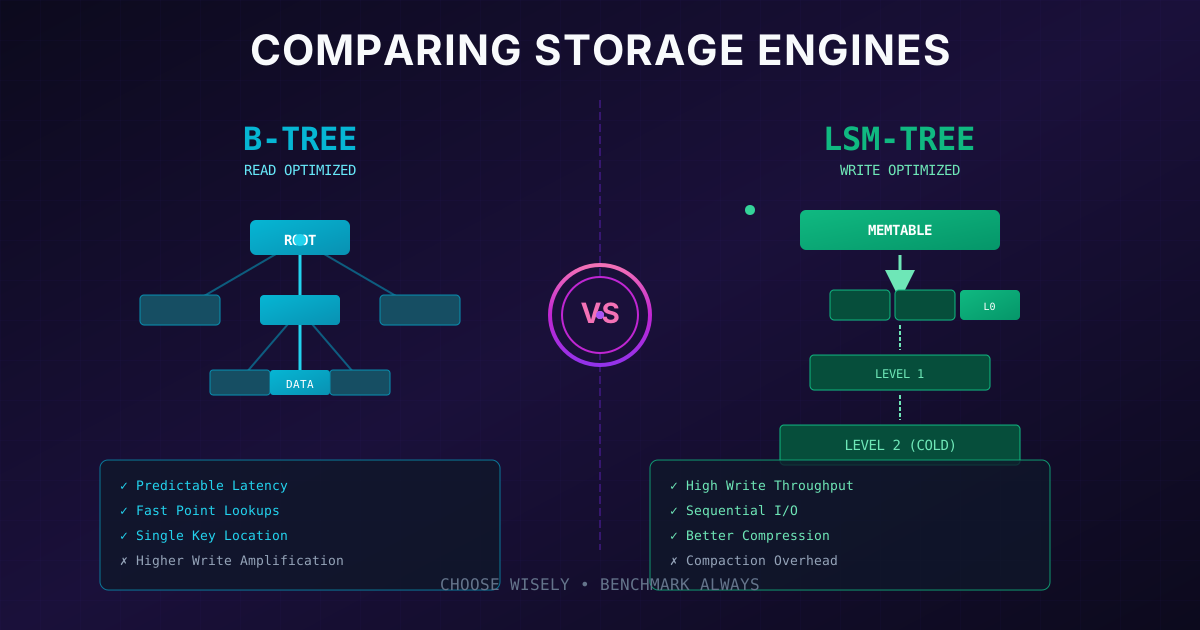
The Big Picture: Which One Wins?
By now you understand both B-Trees and LSM-Trees. So which one should you choose? The honest answer is: it depends on your workload. But let's develop some intuition.
The common rule of thumb is:
- LSM-Trees are typically faster for writes
- B-Trees are typically faster for reads
But benchmarks are notoriously tricky. Results vary wildly based on workload characteristics, hardware, and configuration. The only way to truly know which is better for your use case is to test with your actual data and access patterns.
That said, let's understand why these performance characteristics exist. Once you understand the mechanics, you can reason about which structure fits your needs.
Understanding Write Amplification
One of the most important concepts for comparing storage engines is write amplification, when a single write to the database causes multiple writes to the physical disk.
Neither B-Trees nor LSM-Trees are immune to this. Let's see why.
B-Tree Write Amplification
When you write a single key-value pair to a B-Tree:
- Write to WAL: First, the change goes to the write-ahead log (for crash recovery)
- Write to page: Then, the actual B-Tree page is modified
- Page split overhead: If the page was full, you need to write multiple pages (the split pages plus the parent)
- Full page writes: Even if you only change a few bytes, you write the entire 4 KB page
LSM-Tree Write Amplification
LSM-Trees also rewrite data multiple times:
- Write to WAL: Every write goes to the write-ahead log
- Write to memtable: Data goes to memory (no disk I/O yet)
- Flush to SSTable: When memtable is full, write it to disk
- Compaction: Data gets rewritten multiple times as SSTables are merged
The key difference is when and how this happens. LSM writes are sequential and batched, while B-Tree writes are random and immediate.
Why Write Amplification Matters
Write amplification isn't just an academic concern, it has real consequences:
1. SSD Lifespan
SSDs can only handle a limited number of write cycles before cells wear out. Higher write amplification means your SSD wears out faster.
2. Write Throughput
Disk bandwidth is finite. If your storage engine writes 10x as much data as your application, you can only handle 1/10th of the application writes you'd expect.
3. Cost
More writes = more I/O = more infrastructure cost, especially in cloud environments where you pay for IOPS.
def calculate_write_amplification(
    app_write_bytes: int,
    actual_disk_bytes: int
) -> float:
    """
    Calculate write amplification factor.

    Example:
    - Application writes 1 GB of data
    - Storage engine writes 10 GB to disk
    - Write amplification = 10x
    """
    return actual_disk_bytes / app_write_bytes


# B-Tree example (worst case with page splits)
btree_wa = calculate_write_amplification(
    app_write_bytes=100,  # 100 bytes of user data
    actual_disk_bytes=8192  # WAL + full 4KB page rewrite
)
print(f"B-Tree write amplification (worst case): {btree_wa:.1f}x")

# LSM-Tree example (with compaction)
lsm_wa = calculate_write_amplification(
    app_write_bytes=100,  # 100 bytes of user data
    actual_disk_bytes=1000  # WAL + compaction rewrites over time
)
print(f"LSM-Tree write amplification: {lsm_wa:.1f}x")

# Output:
# B-Tree write amplification (worst case): 81.9x
# LSM-Tree write amplification: 10.0x
Advantages of LSM-Trees
Let's dig into why LSM-Trees often outperform B-Trees for write-heavy workloads.
1. Sequential Writes
This is the biggest advantage. LSM-Trees write data sequentially, new SSTables are written as contiguous blocks of data. B-Trees perform random writes, updating a page means seeking to its location on disk.
On traditional hard drives (HDDs), sequential writes can be 100x faster than random writes. On SSDs, the difference is smaller but still significant.
import time
import os
import random

def benchmark_sequential_write(filepath: str, size_mb: int) -> float:
    """Measure sequential write speed."""
    data = b'x' * (1024 * 1024)  # 1 MB blocks

    start = time.time()
    with open(filepath, 'wb') as f:
        for _ in range(size_mb):
            f.write(data)
        f.flush()
        os.fsync(f.fileno())
    elapsed = time.time() - start

    return size_mb / elapsed  # MB/s


def benchmark_random_write(filepath: str, num_writes: int, file_size_mb: int) -> float:
    """Measure random write speed (simulating B-Tree page updates)."""
    page_size = 4096
    data = b'x' * page_size

    # Create file first
    with open(filepath, 'wb') as f:
        f.write(b'\0' * file_size_mb * 1024 * 1024)

    positions = [random.randint(0, file_size_mb * 1024 * 1024 - page_size)
                 for _ in range(num_writes)]

    start = time.time()
    with open(filepath, 'r+b') as f:
        for pos in positions:
            f.seek(pos)
            f.write(data)
        f.flush()
        os.fsync(f.fileno())
    elapsed = time.time() - start

    bytes_written = num_writes * page_size
    return (bytes_written / (1024 * 1024)) / elapsed  # MB/s


# Note: These benchmarks would show the dramatic difference
# between sequential and random I/O patterns
2. Better Compression
LSM-Trees periodically rewrite all their data during compaction. This means:
- Data is laid out contiguously (great for compression algorithms)
- Similar keys are grouped together
- No wasted space from fragmentation
B-Trees, by contrast, leave gaps in pages. When a page splits, both resulting pages are half-empty. Over time, fragmentation accumulates.
3. Lower Write Amplification (Sometimes)
In many workloads, LSM-Trees have lower write amplification than B-Trees. This is especially true when:
- Updates are common (B-Trees rewrite entire pages)
- Keys are inserted somewhat randomly (causes B-Tree page splits)
- Leveled compaction is used efficiently
However, this isn't universal, it depends heavily on the specific workload and configuration.
Advantages of B-Trees
Now let's look at why B-Trees remain the default choice for many databases.
1. Faster Reads
When you read a key from a B-Tree, you follow a path from root to leaf, typically 3-4 page reads, and you're done. The key is in exactly one place.
With LSM-Trees, you might need to check:
- The memtable
- The most recent SSTable
- The second-most recent SSTable
- ... and so on through multiple levels
Even with Bloom filters helping skip non-existent keys, reads are more complex.
2. Predictable Performance
B-Trees offer more predictable latency. Each operation takes roughly the same amount of time (a few page reads/writes).
LSM-Trees have highly variable performance. Most writes are fast (just memtable + WAL), but periodically compaction kicks in and can:
- Compete for disk bandwidth
- Cause latency spikes
- Use CPU for merge-sort operations
For applications requiring consistent response times (like real-time systems), this unpredictability can be problematic.
3. Each Key Exists in One Place
In a B-Tree, each key exists in exactly one location. This has several benefits:
- Easier to implement transactions: You can lock specific keys
- Simpler concurrency control: No need to coordinate across multiple files
- Immediate consistency: Updates are immediately visible
In LSM-Trees, a key might exist in multiple SSTables (with different values). Only compaction resolves these duplicates.
class BTreeKeyLocation:
    """In B-Tree, each key has exactly one location."""

    def __init__(self):
        self.data = {}  # key -> (page_id, offset)

    def get_location(self, key: str) -> tuple:
        return self.data.get(key)  # Always exactly one place

    def update(self, key: str, page_id: int, offset: int):
        self.data[key] = (page_id, offset)  # Overwrite in place


class LSMKeyLocations:
    """In LSM-Tree, key may exist in multiple places."""

    def __init__(self):
        self.memtable = {}
        self.sstables = []  # List of {key: value} dicts

    def get_all_locations(self, key: str) -> list:
        """A key might be in memtable AND multiple SSTables!"""
        locations = []

        if key in self.memtable:
            locations.append(('memtable', self.memtable[key]))

        for i, sstable in enumerate(self.sstables):
            if key in sstable:
                locations.append((f'sstable_{i}', sstable[key]))

        return locations  # Could be multiple entries!
The Compaction Problem
One significant downside of LSM-Trees deserves special attention: compaction interference.
Compaction runs in the background, merging SSTables to reclaim space and reduce read amplification. But compaction isn't free:
- It consumes disk bandwidth (reading old SSTables, writing new ones)
- It uses CPU cycles (for merge operations)
- It competes with your actual application workload
If your write rate is high enough, compaction might not be able to keep up. This leads to:
- Growing number of SSTables: Reads get slower
- Disk space issues: Old data isn't being reclaimed
- Eventual collapse: The system can become unusable
Well-tuned LSM-Trees handle this gracefully, but it requires careful capacity planning.
SSD Considerations
Modern storage engines increasingly run on SSDs. This changes the calculus somewhat:
How SSDs Work
SSDs can't overwrite data in place. To update a block, they must:
- Read the entire erase block (often 256 KB - 4 MB)
- Modify the data
- Erase the block
- Write the new data
The SSD's internal firmware (Flash Translation Layer, or FTL) handles this complexity, often using its own log-structured approach internally!
Implications
Because SSDs internally prefer sequential writes, the gap between B-Trees and LSM-Trees narrows somewhat. However:
- Write amplification still matters: SSDs wear out faster with more writes
- LSM-Trees still compress better: More data fits in less space
- I/O bandwidth is still finite: More efficient writes = more throughput
Decision Framework
Here's a practical framework for choosing between B-Trees and LSM-Trees:
Quick Reference Comparison
| Factor | B-Tree | LSM-Tree | | ----------------------- | ------------------------- | ---------------------------------- | | Write Speed | Moderate | High | | Read Speed | High | Moderate | | Write Pattern | Random | Sequential | | Space Efficiency | Lower (fragmentation) | Higher (compaction) | | Compression | Limited | Excellent | | Latency Consistency | Very consistent | Variable (compaction spikes) | | Concurrency | Needs latches | Simpler (immutable segments) | | Key Location | One place | Multiple places until compacted | | Best For | Read-heavy, OLTP | Write-heavy, time-series, logs |
Real-World Examples
B-Tree Databases
- PostgreSQL: Default index type
- MySQL InnoDB: Primary storage engine
- Oracle: Traditional enterprise choice
- SQL Server: Microsoft's flagship
LSM-Tree Databases
- RocksDB: Facebook's embedded engine
- LevelDB: Google's embedded engine
- Cassandra: Distributed wide-column store
- HBase: Hadoop database
- ScyllaDB: High-performance Cassandra alternative
# Pseudocode: Choosing a storage engine

def choose_storage_engine(workload):
    """
    Decision logic based on workload characteristics.
    """

    if workload.write_ratio > 0.7:
        # Write-heavy workloads benefit from LSM
        return "LSM-Tree (e.g., RocksDB, Cassandra)"

    if workload.read_ratio > 0.7:
        # Read-heavy workloads benefit from B-Tree
        return "B-Tree (e.g., PostgreSQL, MySQL)"

    if workload.requires_predictable_latency:
        # B-Trees have more consistent performance
        return "B-Tree (e.g., PostgreSQL, MySQL)"

    if workload.disk_space_limited:
        # LSM-Trees compress better
        return "LSM-Tree (e.g., RocksDB, Cassandra)"

    if workload.data_type == "time_series":
        # Time-series = write-heavy, append-only
        return "LSM-Tree (e.g., InfluxDB, TimescaleDB)"

    if workload.data_type == "transactional":
        # OLTP needs consistent read/write
        return "B-Tree (e.g., PostgreSQL, MySQL)"

    # Default: B-Tree is safer, more mature
    return "B-Tree, but benchmark both!"


class Workload:
    def __init__(self):
        self.write_ratio = 0.5
        self.read_ratio = 0.5
        self.requires_predictable_latency = False
        self.disk_space_limited = False
        self.data_type = "general"
Key Takeaways
-
Write Amplification: Both structures rewrite data multiple times. Measure it for your workload.
-
Sequential vs Random I/O: LSM-Trees win here, especially on HDDs.
-
Read Complexity: B-Trees find keys in one place; LSM-Trees may check multiple levels.
-
Compaction Trade-offs: LSM-Tree background compaction can interfere with foreground operations.
-
No Universal Winner: The right choice depends on your specific workload, hardware, and requirements.
-
When in Doubt, Benchmark: Synthetic benchmarks can be misleading. Test with your actual data and access patterns.
Understanding these trade-offs makes you a better engineer. You're not just picking a database, you're making an informed decision based on how storage engines actually work under the hood.