JSON, XML, and Binary Variants: The Trade-offs Nobody Tells You About
JSON looks so simple—until Twitter discovers JavaScript can't handle their tweet IDs. Learn the four hidden problems with universal formats and when to use binary alternatives like MessagePack.
Why This Matters
JSON looks so simple. Just curly braces and colons, right? Then Twitter discovers that JavaScript can't handle their tweet IDs because they're too large for a 64-bit float. Suddenly, they're sending every ID twice—once as a number, once as a string—because JSON has no integer type. Welcome to the subtle nightmares hiding inside "universal" data formats.
Real-world relevance: JSON, XML, and CSV power most of the data interchange on the planet. Understanding their hidden limitations will save you from production incidents involving corrupted numbers, bloated payloads, and mysterious parsing failures.
Learning Objectives
- [ ] Identify the four subtle problems with JSON, XML, and CSV that cause real production issues
- [ ] Compare text-based formats (JSON, XML, CSV) with binary variants (MessagePack, BSON)
- [ ] Evaluate when human-readability is worth the performance trade-off
- [ ] Apply the right format choice based on internal vs. external data exchange needs
The Big Picture: Standardized Formats
In the previous section, we learned why language-specific formats (pickle, Java Serializable) are dangerous. The obvious solution? Use formats that every language can read and write.
The three universal champions:
| Format | Strengths | Primary Use Case | |--------|-----------|------------------| | JSON | Simple, web-native, JavaScript built-in | APIs, config files | | XML | Schema support, namespaces, mature tooling | Enterprise, SOAP, documents | | CSV | Dead simple, spreadsheet-friendly | Data imports/exports |
These formats have achieved something remarkable: cross-organizational agreement. When Netflix sends data to a partner, both sides understand JSON. That's worth a lot.
But beneath the surface, these "simple" formats hide subtle traps.
The Four Hidden Problems
Problem 1: Number Ambiguity (The Twitter Bug)
JSON distinguishes strings from numbers, but it doesn't distinguish integers from floats. And it doesn't specify precision.
Diagram Explanation: Twitter's tweet IDs exceed 2^53, the maximum integer that IEEE 754 double-precision floats can represent exactly. JavaScript parses JSON numbers as floats, corrupting large integers. Twitter's workaround: include every ID twice—as a number and as a string.
📊 The Math: 2^53 = 9,007,199,254,740,992. Any integer larger than this gets rounded when parsed as a JavaScript number. Tweet IDs crossed this threshold in 2013.
XML and CSV are even worse—they can't distinguish numbers from strings at all without an external schema.
# The problem in action
import json

tweet_id = 1234567890123456789  # 64-bit integer

# JSON encodes it correctly...
json_str = json.dumps({"id": tweet_id})
print(json_str)  # {"id": 1234567890123456789}

# But JavaScript would parse this as:
# 1234567890123456800 (last digits corrupted!)

# The workaround:
safe_json = json.dumps({
    "id": tweet_id,
    "id_str": str(tweet_id)  # Always use this in JS!
})
print(safe_json)
# {"id": 1234567890123456789, "id_str": "1234567890123456789"}
Problem 2: No Binary Data Support
JSON and XML handle Unicode text beautifully. But what about binary data—images, encrypted blobs, compressed chunks?
The workaround: Base64 encoding. Take your bytes, encode them as ASCII text.
The cost: 33% size increase.
Diagram Explanation: Base64 converts every 3 bytes into 4 characters (using A-Z, a-z, 0-9, +, /). This makes binary data "safe" for text formats but adds 33% overhead.
import base64
import json

# A small image (pretend this is 1 MB)
binary_data = b'\x89PNG\r\n\x1a\n...'  # PNG header

# Must encode as Base64 for JSON
encoded = base64.b64encode(binary_data).decode('ascii')

payload = {"image": encoded}
json_str = json.dumps(payload)

# Size comparison
print(f"Original binary: {len(binary_data)} bytes")
print(f"Base64 in JSON: {len(json_str)} bytes")
# A 1 MB image becomes 1.37 MB in JSON (Base64 + JSON overhead)
Problem 3: Schema Complexity (or Absence)
Both XML and JSON have optional schema languages:
- XML Schema (XSD): Powerful but notoriously complex
- JSON Schema: Simpler but less adopted
The problem? Most JSON tools don't use schemas. This means:
- No automatic validation
- No documentation of expected types
- Application code must hardcode assumptions
Diagram Explanation: Schemas define exactly what fields exist, their types, and constraints. Without schemas, every application must guess—leading to inconsistencies and bugs when assumptions differ.
Problem 4: CSV is a Minefield
CSV looks simple: values separated by commas. But:
- What if a value contains a comma? → Use quotes
- What if a value contains a quote? → Escape it (but how?)
- What if a value contains a newline? → Good luck
- What defines each column? → Nothing. You just have to know.
# CSV edge cases that break parsers
import csv
import io

# This innocent data...
data = [
    ["Name", "Bio"],
    ["Alice", "Loves coding, coffee, and cats"],  # Comma in value!
    ["Bob", 'Says "Hello World"'],                 # Quotes in value!
    ["Carol", "Line 1\nLine 2"]                    # Newline in value!
]

# Proper CSV handles it...
output = io.StringIO()
writer = csv.writer(output)
writer.writerows(data)
print(output.getvalue())

# Output (properly escaped):
# Name,Bio
# Alice,"Loves coding, coffee, and cats"
# Bob,"Says ""Hello World"""
# Carol,"Line 1
# Line 2"

# But many "CSV parsers" choke on this!
⚠️ Horror Story: A bank's CSV export used commas in address fields. The naive parser split "123 Main St, Apt 4" into two columns, corrupting millions of records.
Binary Encoding: The Space-Saving Alternative
For internal data (not shared with other organizations), you can use binary formats:
| Format | Based On | Size Savings | Schema Required? | |--------|----------|--------------|------------------| | MessagePack | JSON | ~20% smaller | No | | BSON | JSON | Similar size | No | | BJSON | JSON | ~20% smaller | No | | WBXML | XML | Significant | Yes |
MessagePack Deep Dive
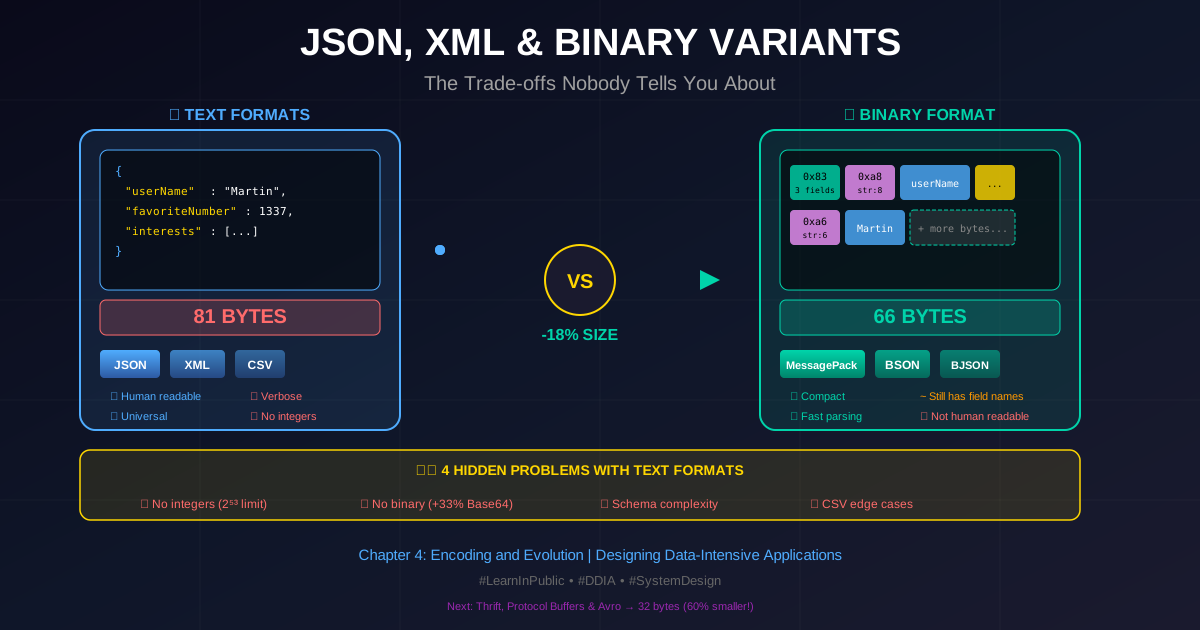
Let's encode this JSON object:
{
  "userName": "Martin",
  "favoriteNumber": 1337,
  "interests": ["daydreaming", "hacking"]
}
Text JSON: 81 bytes (with whitespace removed)
MessagePack: 66 bytes
Diagram Explanation: MessagePack uses type-prefixed bytes. 0x83 means "object with 3 fields" (top nibble = type, bottom = count). 0xa8 means "string of 8 characters". This eliminates JSON's quotes, colons, and braces.
The Honest Truth About Binary JSON
81 bytes → 66 bytes is only an 18% reduction. Is that worth losing human-readability?
For small payloads: Probably not.
For terabytes of data: Absolutely.
import json
import msgpack  # pip install msgpack

record = {
    "userName": "Martin",
    "favoriteNumber": 1337,
    "interests": ["daydreaming", "hacking"]
}

# JSON encoding
json_bytes = json.dumps(record).encode('utf-8')
print(f"JSON: {len(json_bytes)} bytes")  # 81 bytes

# MessagePack encoding
msgpack_bytes = msgpack.packb(record)
print(f"MessagePack: {len(msgpack_bytes)} bytes")  # 66 bytes

# Savings
savings = (1 - len(msgpack_bytes) / len(json_bytes)) * 100
print(f"Savings: {savings:.1f}%")  # 18.5%

# At scale:
# 1 TB of JSON logs → 815 GB in MessagePack
# That's 185 GB saved = real money in cloud storage
The Field Name Problem
Notice that MessagePack still includes "userName", "favoriteNumber", "interests" in the encoded bytes. Every record repeats these strings.
Spoiler for next section: Thrift, Protocol Buffers, and Avro solve this with schemas, getting the same record down to just 32 bytes.
Real-World Analogy
Think of data formats like writing systems for different purposes:
| Format | Analogy | Best For | |--------|---------|----------| | JSON | Handwritten letter | Human readability, quick notes | | XML | Legal contract | Formal structure, namespaces, validation | | CSV | Grocery list | Simple lists, spreadsheet import | | MessagePack | Shorthand notes | Speed, personal use, when you know the context | | Protobuf | Morse code | Maximum efficiency, when every byte counts |
Just as you wouldn't write a legal contract in grocery-list format, you shouldn't use CSV for complex nested data. And just as Morse code requires a codebook (schema), so do efficient binary formats.
When to Use What
Diagram Explanation: This decision tree helps you choose the right format. For external data exchange, default to JSON. For high-volume internal data, consider binary formats—but wait for the next section to see even better options.
Key Takeaways
-
JSON has no integer type: Numbers over 2^53 get corrupted in JavaScript. For large IDs, send them as strings too.
-
Binary data costs +33% in JSON: Base64 encoding is the only option, and it bloats your payload. If you're sending lots of binary, consider a binary format.
-
Schemas are optional but crucial: Without schemas, your application code must guess types and validate manually. This leads to bugs when assumptions differ.
-
CSV is deceptively dangerous: Commas, quotes, and newlines in values break naive parsers. Always use a proper CSV library with escaping.
-
Binary JSON variants save ~20%: MessagePack, BSON, etc. help but still include field names. For real efficiency, you need schemas (Protobuf, Avro).
Common Pitfalls
| ❌ Misconception | ✅ Reality | |------------------|-----------| | "JSON handles all numbers fine" | JavaScript corrupts integers > 2^53. Send large IDs as strings. | | "Base64 is negligible overhead" | 33% size increase adds up. 1 TB becomes 1.33 TB. | | "JSON Schema is widely used" | Most JSON tools ignore schemas. You'll likely write manual validation. | | "CSV is simple and safe" | Edge cases (commas, quotes, newlines) break naive parsers constantly. | | "Binary = unreadable = bad" | For internal, high-volume data, binary formats save real money and time. | | "MessagePack is always better" | Only ~20% savings. Not worth it for small, human-debugged payloads. |
Interview Prep
Q: What are the main limitations of JSON as a data format?
A: (1) No integer type—large numbers become floats and lose precision. (2) No binary data support—must use Base64 (+33% overhead). (3) Optional schemas mean most tools don't validate. (4) No standard for dates, times, or other common types.
Q: When would you choose MessagePack over JSON?
A: For internal data transfer where human readability isn't needed and you're processing high volumes (terabytes). The ~20% size reduction and faster parsing add up at scale. But for external APIs or debugging-heavy development, JSON's readability wins.
Q: How does Twitter handle large tweet IDs in JSON?
A: They send each ID twice: once as a number (id) and once as a string (id_str). JavaScript clients should use id_str because the number field gets corrupted by IEEE 754 float precision limits.
Q: Why don't binary JSON variants get better compression?
A: They still include all field names in every record. To eliminate this redundancy, you need schema-based formats like Protocol Buffers or Avro, which use numeric field IDs instead of string names.
What's Next?
We've seen that JSON and its binary variants still waste space by repeating field names. The next section introduces Thrift, Protocol Buffers, and Avro—formats that use schemas to achieve:
- 32 bytes instead of 81 (60% smaller than JSON!)
- Automatic schema evolution (add fields without breaking old code)
- Generated code for type-safe serialization
These are the formats powering Google, Facebook, and LinkedIn's internal data infrastructure.