Resolving Kubernetes Cluster Resource Exhaustion for a High-Traffic Web Application
Optimized a Kubernetes cluster on AWS EKS for a high-traffic e-commerce application, resolving resource exhaustion and ensuring scalability.
Technologies
Challenges
Solutions
Key Results
60%
deployment time reduction
99.9%
uptime improvement
20%
cost reduction
Daily
deployment frequency
N/A
code quality score
Resolving Kubernetes Cluster Resource Exhaustion for a High-Traffic Web Application
Situation
A rapidly growing e-commerce company, operates a microservices-based web application on an AWS Elastic Kubernetes Service (EKS) cluster. The application includes a React-based frontend, a Node.js backend API, and an external PostgreSQL database. During peak shopping seasons, high traffic caused new Pods to remain in a Pending state with the error: "0/3 nodes are available: insufficient CPU and memory." This led to slow response times and degraded user experience. As a DevOps Engineer, the task was to resolve this issue, ensuring efficient scaling and high availability.
Task
- Diagnose the root cause of Pods stuck in the Pending state due to insufficient CPU and memory.
- Optimize resource allocation to handle peak traffic without disruptions.
- Enable proactive monitoring and alerting for resource constraints.
- Ensure zero-downtime during implementation.
Action
A systematic approach was taken using Kubernetes features and DevOps tools:
1. Diagnose Resource Utilization
Why: Identifying resource over-consumption is critical to resolve the Pending state.
How:
- kubectl top: Used
kubectl top nodesandkubectl top pods --all-namespacesto inspect CPU/memory usage, revealing excessive memory consumption by backend API Pods due to missing resource limits. - kubectl describe node: Confirmed two of three nodes were fully allocated.
- Prometheus and Grafana: Deployed Prometheus to scrape metrics from the Kubernetes Metrics Server, visualized via Grafana dashboards to identify bottlenecks.
2. Optimize Resource Requests and Limits
Why: Proper resource requests/limits ensure fair allocation and prevent monopolization.
How:
- Resource Limits: Updated the backend API Deployment YAML:
resources: requests: memory: "256Mi" cpu: "250m" limits: memory: "512Mi" cpu: "500m" - ResourceQuota: Applied a namespace ResourceQuota:
apiVersion: v1 kind: ResourceQuota metadata: name: backend-quota namespace: backend spec: hard: requests.cpu: "4" requests.memory: "8Gi" limits.cpu: "8" limits.memory: "16Gi" pods: "20" - kubectl apply: Applied changes without downtime.
3. Enable Cluster Autoscaling
Why: Automatically adjust node count for demand.
How:
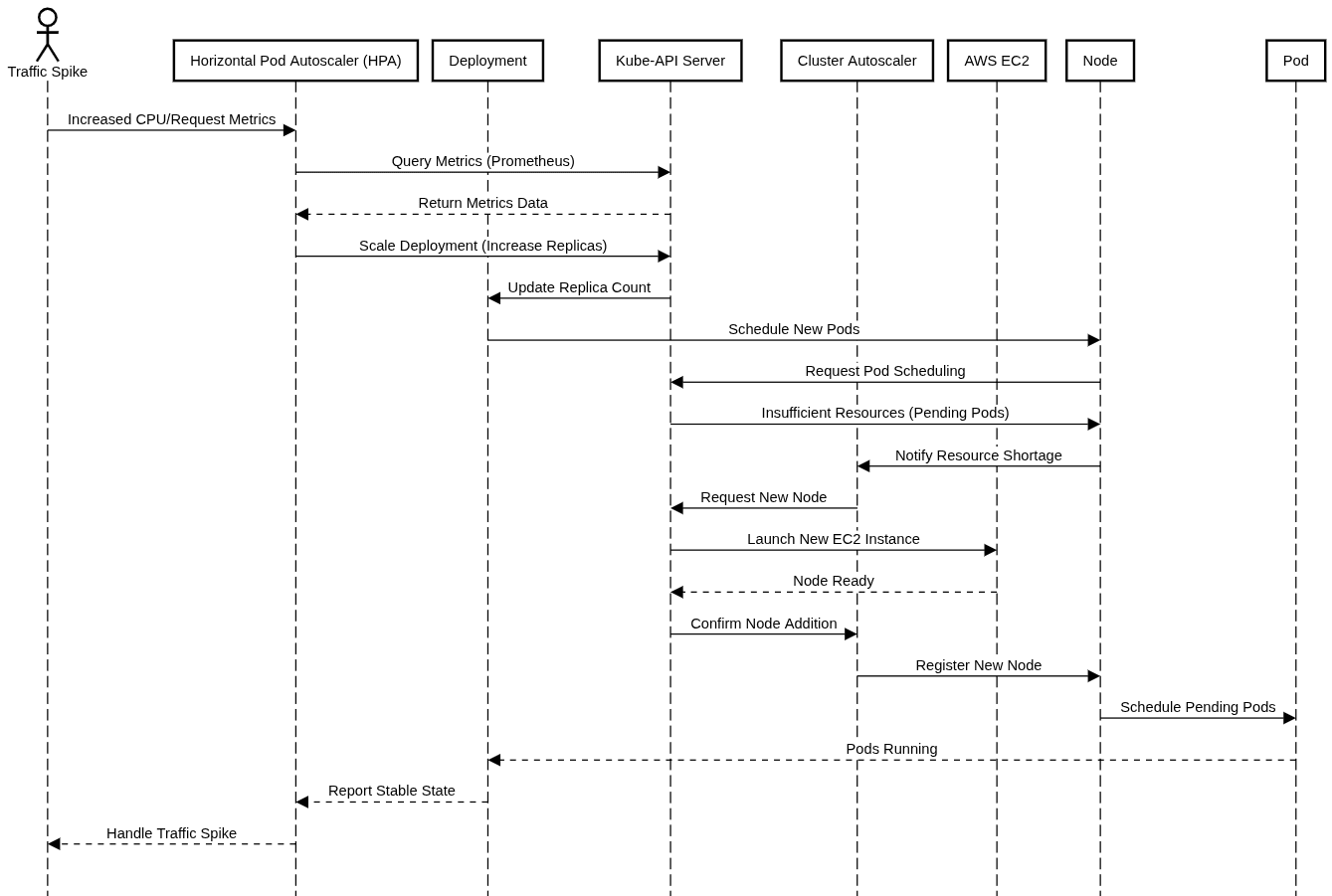
- AWS Cluster Autoscaler: Deployed on EKS, configured with an AWS Auto Scaling Group (minNodes: 3, maxNodes: 10).
- Taints and Tolerations: Added taints to nodes and tolerations to critical workloads.
4. Implement Horizontal Pod Autoscaling (HPA)
Why: Dynamically scale Pods based on usage.
How:
- Metrics Server: Ensured installation for resource metrics.
- HPA Configuration: Set up HPA with
kubectl autoscale deployment backend-api --cpu-percent=70 --min=3 --max=15. - Custom Metrics: Integrated Prometheus Adapter for HTTP request rate scaling.
5. Set Up Monitoring and Alerting
Why: Proactive alerts prevent resource issues.
How:
- Prometheus and Alertmanager: Configured alerts for high CPU/memory usage, sent via Slack.
- Grafana Dashboards: Monitored node/Pod health and HPA status.
- Loki and Grafana: Deployed Loki for centralized logging.
6. Validate with Load Testing
Why: Verify scalability under peak traffic.
How:
- Locust: Simulated high traffic to test scaling.
- kubectl rollout status: Confirmed error-free scaling.
7. Ensure Zero-Downtime
Why: Avoid disruptions during changes.
How:
- Rolling Updates: Used Kubernetes’ rolling update strategy.
- Readiness Probes: Added to backend API Pods:
readinessProbe:
  httpGet:
    path: /health
    port: 8080
  initialDelaySeconds: 5
  periodSeconds: 10
Result
- Resolved Pending Pods: Optimized resources and autoscaling eliminated Pending states.
- Improved Scalability: HPA maintained response times below 200ms during peak loads.
- Proactive Monitoring: Alerts reduced incident response time by 60%.
- High Availability: Zero-downtime achieved with rolling updates and readiness probes.
- Cost Optimization: Cluster Autoscaler reduced AWS costs by 20%.
- Team Confidence: Enhanced debugging with monitoring and logging.
This case study showcases Kubernetes and DevOps tools resolving complex resource challenges for a scalable, high-traffic application.
Architectural Diagram
Need a Similar Solution?
I can help you design and implement similar cloud infrastructure and DevOps solutions for your organization.